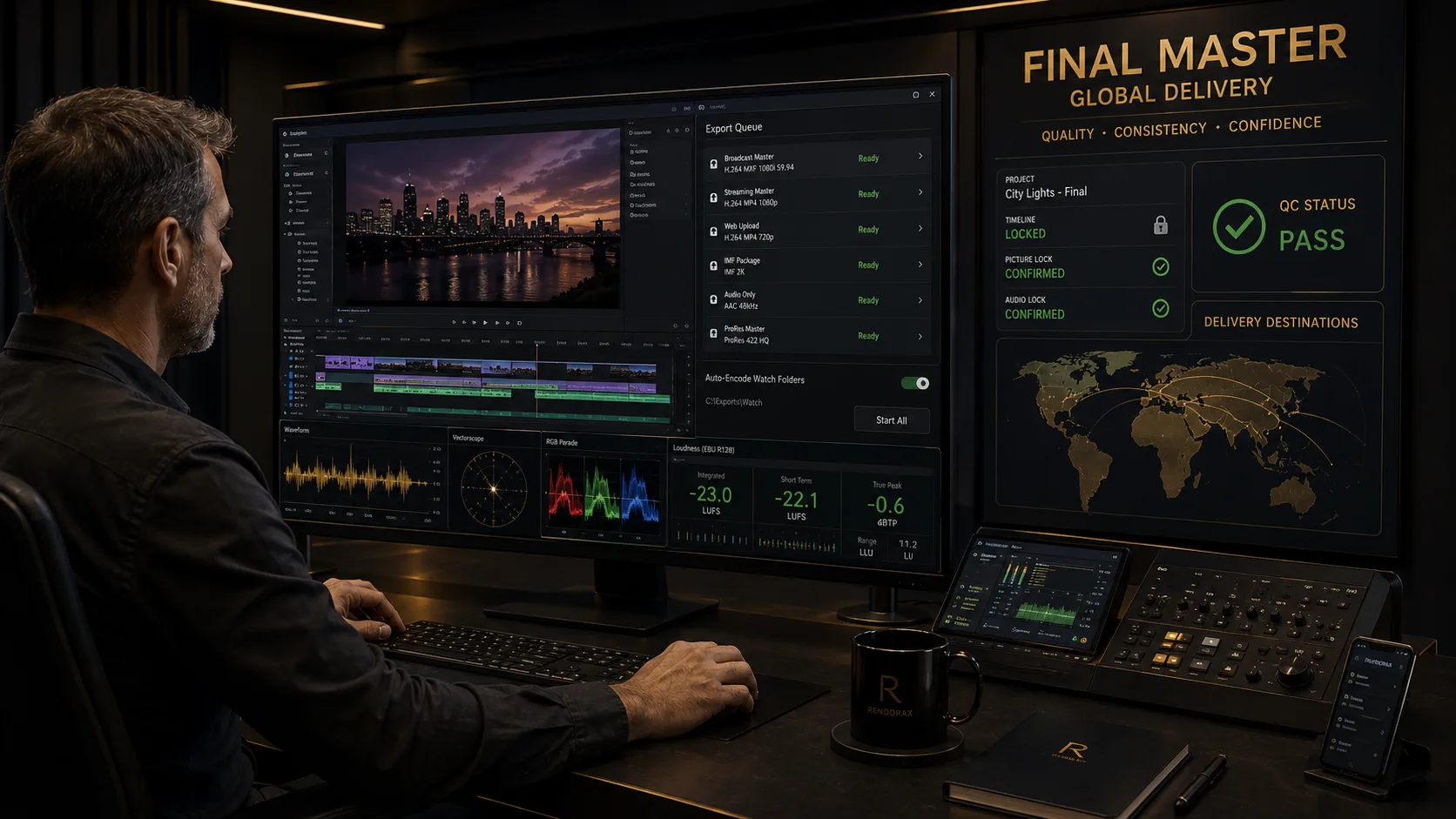
The final export is not simply the last button pressed in an edit application. Professional master delivery is a controlled technical workflow that begins at picture lock and ends only when the receiving system accepts a verified package.
That package may involve codec and container selection, resolution and frame rate, color management, audio compliance, captions and subtitles, automated and human quality control, packaging, and delivery verification. One project often needs several deliverables— not one universal file.
What Is a Master Export?
A master export is a deliberate, specification-driven render of the finished program. Teams commonly distinguish:
- Mezzanine master — high-quality lightly compressed file for finishing, versioning, and re-encoding
- Broadcast master — channel-ready package matching a linear TV delivery profile
- OTT master — streaming-platform mezzanine or IMF-style package for downstream ABR encodes
- Archive master — retention copy optimized for longevity and future reuse
- Review copy — watermarked or compressed file for client feedback
- Distribution encode — consumer or platform ABR derivative (often H.264/H.265)
- Platform derivative — reframes, language versions, or crop variants built from the master
Definition
Mezzanine master
A mezzanine master is a high-quality, lightly compressed working master used for finishing, versioning, and re-encoding. It is built for editorial reliability—not for end-user streaming.
Definition
Broadcast master
A broadcast master is the channel-ready package that matches a linear television delivery profile: picture, audio, captions, naming, and QC criteria defined by the broadcaster.
Definition
Delivery file
A delivery file is the object submitted for ingest—sometimes the mezzanine itself, sometimes a profile-specific MXF, IMF package, or platform derivative. Upload success is not the same as acceptance.
Master File vs Delivery File
A high-quality source master is not always the same object as the file a platform will stream. Proxies, review files, and archive packages each serve a different audience and risk profile.
| Type | Primary purpose | Quality | Compression | Size tendency | Audience | Re-encode suitability |
|---|---|---|---|---|---|---|
| Mezzanine master | Finish & version | Very high | Light | Large | Post house | Excellent |
| Broadcast/OTT delivery | Ingest acceptance | Spec-defined | Profile-defined | Varies | Broadcaster/OTT | Limited |
| Review file | Feedback | Good enough | Heavy | Small | Client | Poor |
| Archive master | Retention | Very high | Light/none | Large | Archive team | Excellent |
| Proxy | Edit/browse | Lower | Heavy | Small | Editors | Not for delivery |
Why Delivery Specifications Matter
Incorrect export choices create expensive failures: broadcast rejection, playback failure, gamma shift, crushed or lifted levels, frame-rate conversion artifacts, audio channel mismatch, subtitle rejection, excessive file size, visible compression, wrong aspect ratio, or failed automated QC. Specifications exist so machines and humans can validate the same checklist.
Containers vs Codecs
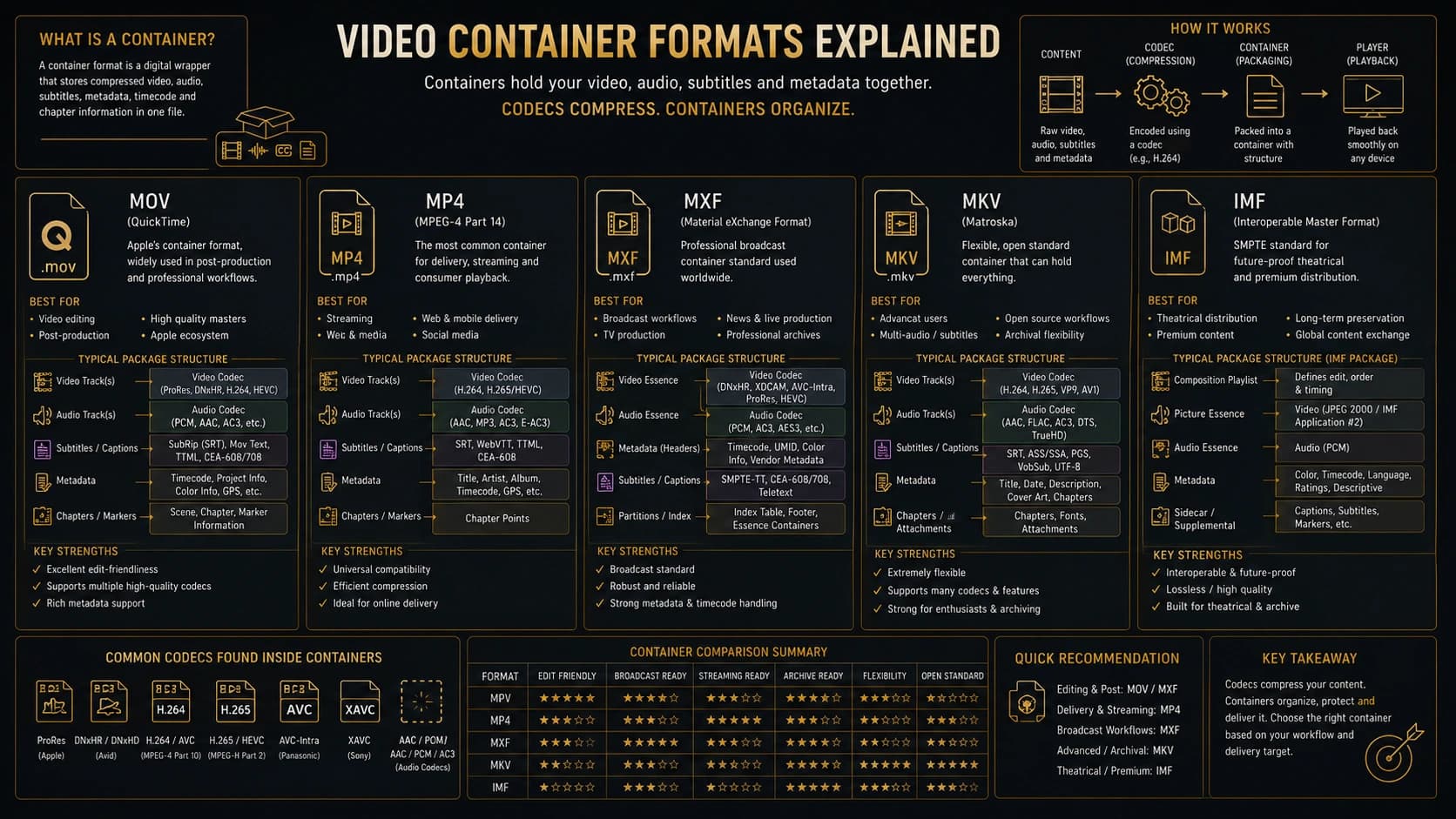
A container is the wrapper (MOV, MP4, MXF, MKV, or an IMF package structure). A codec is the compression method for picture or audio essence (ProRes, DNxHR, H.264, H.265, AVC-Intra, XAVC, JPEG 2000, and others).
Definition
Container
A container wraps tracks, timing, and metadata. Changing the extension does not change the codec. MXF, MOV, and MP4 are containers—not picture compression methods.
Definition
Codec
A codec compresses or expands picture or audio essence. ProRes, DNxHR, H.264, and JPEG 2000 are codecs. The same codec can live in more than one container when the destination profile allows it.
Definition
MXF
Material eXchange Format is a professional container family widely used in broadcast. The picture essence inside may be XAVC, AVC-Intra, DNx, JPEG 2000, or another accepted codec—MXF itself is not a codec.
Practical pairings include ProRes inside MOV, H.264 inside MP4, AVC-Intra or XAVC inside MXF, and JPEG 2000 essence inside an IMF composition. Not every combination is universally supported—always confirm the destination profile.
Professional Codec Comparison
Mezzanine families such as Apple ProRes and Avid DNxHR/DNxHD prioritize editability and quality. Long-GOP codecs such as H.264/AVC and H.265/HEVC prioritize distribution efficiency. Intra-frame broadcast codecs such as AVC-Intra and XAVC, and JPEG 2000 in IMF contexts, serve specific delivery and archive ecosystems.
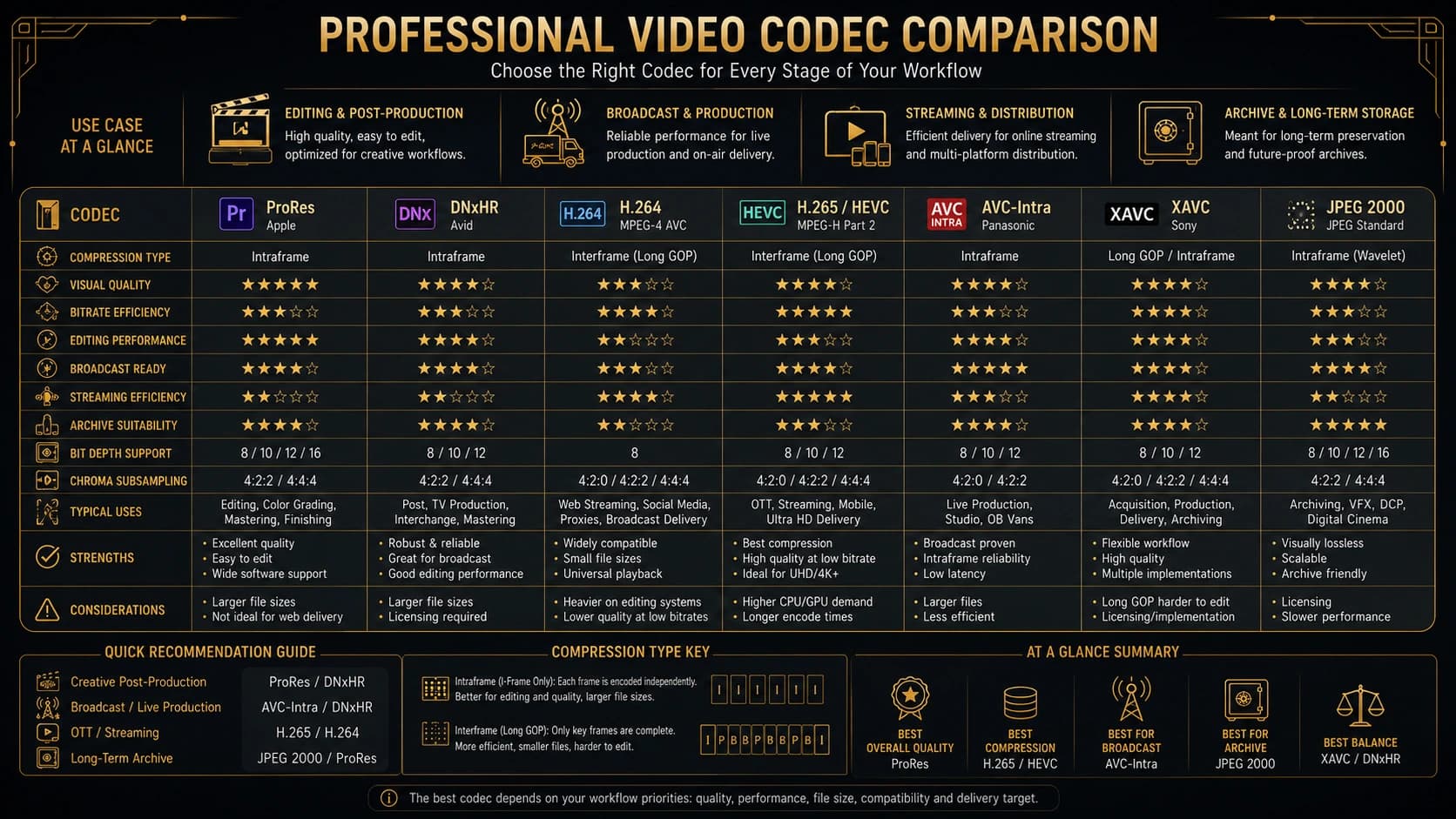
| Codec | Compression | Typical use | Editing | Size tendency | Alpha | Broadcast | OTT | Archive |
|---|---|---|---|---|---|---|---|---|
| ProRes 422 | Light / intra-ish | Edit mezzanine | Excellent | Large | No | Sometimes | Mezzanine | Good |
| ProRes 422 HQ | Light | Grade/finish | Excellent | Larger | No | Often accepted | Mezzanine | Strong |
| ProRes 4444 | Light | VFX/alpha | Very good | Largest ProRes | Yes | Specialist | Specialist | Strong |
| DNxHR HQ | Light | Edit mezzanine | Excellent | Large | No | Varies | Mezzanine | Good |
| DNxHR HQX | Light 10-bit | Finish/grade | Excellent | Large | No | Varies | Mezzanine | Strong |
| H.264 / AVC | Heavy long-GOP | Distribution | Fair | Small | Rare | Limited | Common ABR | Weak |
| H.265 / HEVC | Heavy long-GOP | UHD delivery | Fair/poor | Smaller | Rare | Growing | Common ABR | Weak |
| AVC-Intra | Intra | Broadcast MXF | Good | Large | No | Strong | Uncommon | Good |
| XAVC | Profile-based | Broadcast/Sony | Good | Varies | No | Strong | Uncommon | Good |
| JPEG 2000 | Intra / IMF | IMF / D-Cinema | Specialist | Large | Varies | IMF paths | IMF paths | Strong |
Labels are generalized and workflow-dependent. Exact profiles, bitrates, and acceptance rules come from the receiving specification.
| Codec | Editing responsiveness | Compression efficiency | File-size tendency | Delivery suitability | Archive suitability | Alpha support |
|---|---|---|---|---|---|---|
| ProRes 422 HQ | High | Low–medium | High | Mezzanine / some TV | High | No |
| ProRes 4444 | High | Low–medium | Very high | Specialist | High | Yes |
| DNxHR HQX | High | Low–medium | High | Mezzanine | High | No |
| H.264 | Medium–low | High | Low | Consumer/OTT ABR | Low | Usually no |
| H.265 | Low | Very high | Very low | UHD ABR | Low | Usually no |
| JPEG 2000 | Specialist | Medium | High | IMF / cinema paths | High | Varies |
Definition
ProRes
Apple ProRes is a family of lightly compressed mezzanine codecs optimized for editing and finishing. Variants such as 422, 422 HQ, and 4444 trade file size, chroma richness, and alpha support.
Definition
DNxHR
Avid DNxHR is a resolution-independent mezzanine family used for editing and finishing. HQ and HQX variants are common choices when teams need responsive timelines and strong multi-generation behaviour.
Definition
Chroma subsampling
Chroma subsampling (4:4:4, 4:2:2, 4:2:0) describes how colour detail is stored relative to luma. Richer sampling helps grading and keying; distribution encodes often use 4:2:0 to save bandwidth.
When Professionals Choose Each Codec
Codec tables describe capabilities. Production decisions answer a different question: what job must this file perform next?
ProRes 422
Strong for day-to-day editing, online review masters that still need polish, and many agency handoffs. Suitable when alpha is not required and storage must stay manageable. Less ideal as the only long-term archive if HQ or 4444 was available and budget allows.
ProRes 422 HQ
The default finishing mezzanine for many colour and broadcast pipelines: excellent editing performance, strong multi-generation behaviour, and frequent acceptance as an OTT or agency mezzanine. Prefer HQ over 422 when grading headroom matters.
ProRes 4444
Choose for motion graphics, keyed composites, and alpha-channel deliverables. Excellent for VFX plates and branded overlays. File size is larger; do not use it as a casual review format.
DNxHR HQ and HQX
Prefer in Avid-centric facilities or mixed OS finishing rooms that standardize on DNx. HQ covers many editorial mezzanines; HQX is the stronger 10-bit finishing choice for grading and multi-generation work.
AVC-Intra and XAVC
Common when the destination is an MXF broadcast profile. They prioritize ingest compliance over creative editing comfort. Confirm the exact profile, raster, and audio layout on the channel sheet.
JPEG 2000
Typical inside IMF and certain cinema/archive paths. Treat as a specialist finishing and packaging codec—not a casual editorial timeline format unless the facility is built for it.
H.264 and H.265
Best for distribution, social, and ABR ladders—not as the sole archive or finishing master. H.265 improves compression for UHD delivery but remains a weak primary editing mezzanine.
Resolution and Raster Dimensions
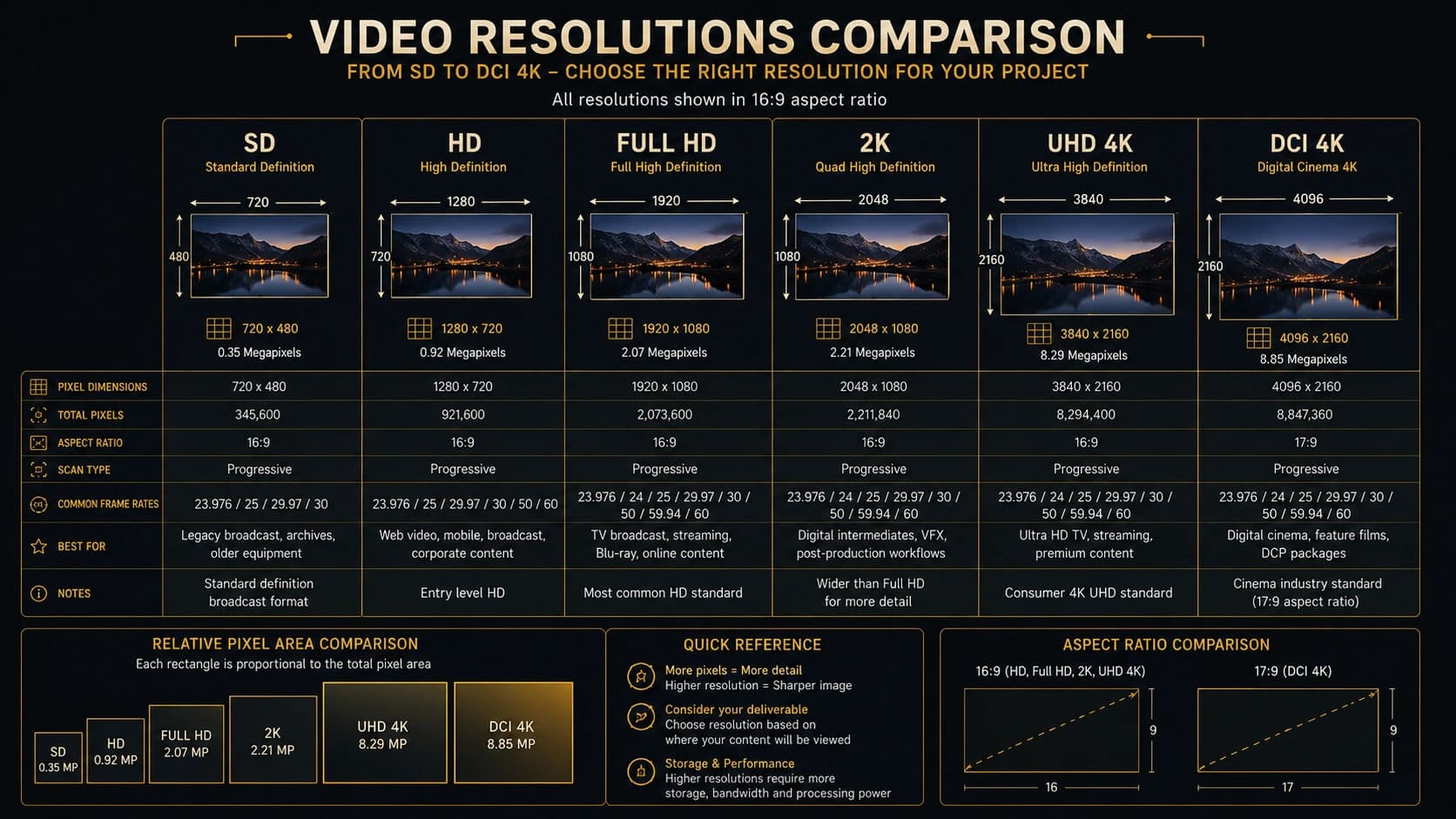
Common rasters include SD, 720p HD, 1920×1080 Full HD, 2048×1080 DCI 2K, 3840×2160 UHD, and 4096×2160 DCI 4K. UHD is not identical to DCI 4K. Resolution alone does not determine quality; upscaling does not restore missing source detail; platform specifications must be followed.
Frame Rate and Scan Type
Delivery briefs commonly call for 23.976, 24, 25, 29.97, 30, 50, 59.94, or 60 fps, with progressive, interlaced, or PsF scan where still required. Drop-frame and non-drop-frame timecode affect labeling, not physics. 23.976 and 24 are not interchangeable. Frame-rate conversion can introduce cadence and sync problems—treat it as a finishing decision, not a silent export toggle.
Bit Depth and Chroma Subsampling
Bit depth (8-, 10-, 12-bit) and chroma sampling (4:2:0, 4:2:2, 4:4:4) influence grading headroom, keying, HDR workflows, banding risk, compression behavior, and archive quality. Heavy grading and VFX benefit from higher bit depth and richer chroma; many distribution encodes remain 8-bit 4:2:0 by design.
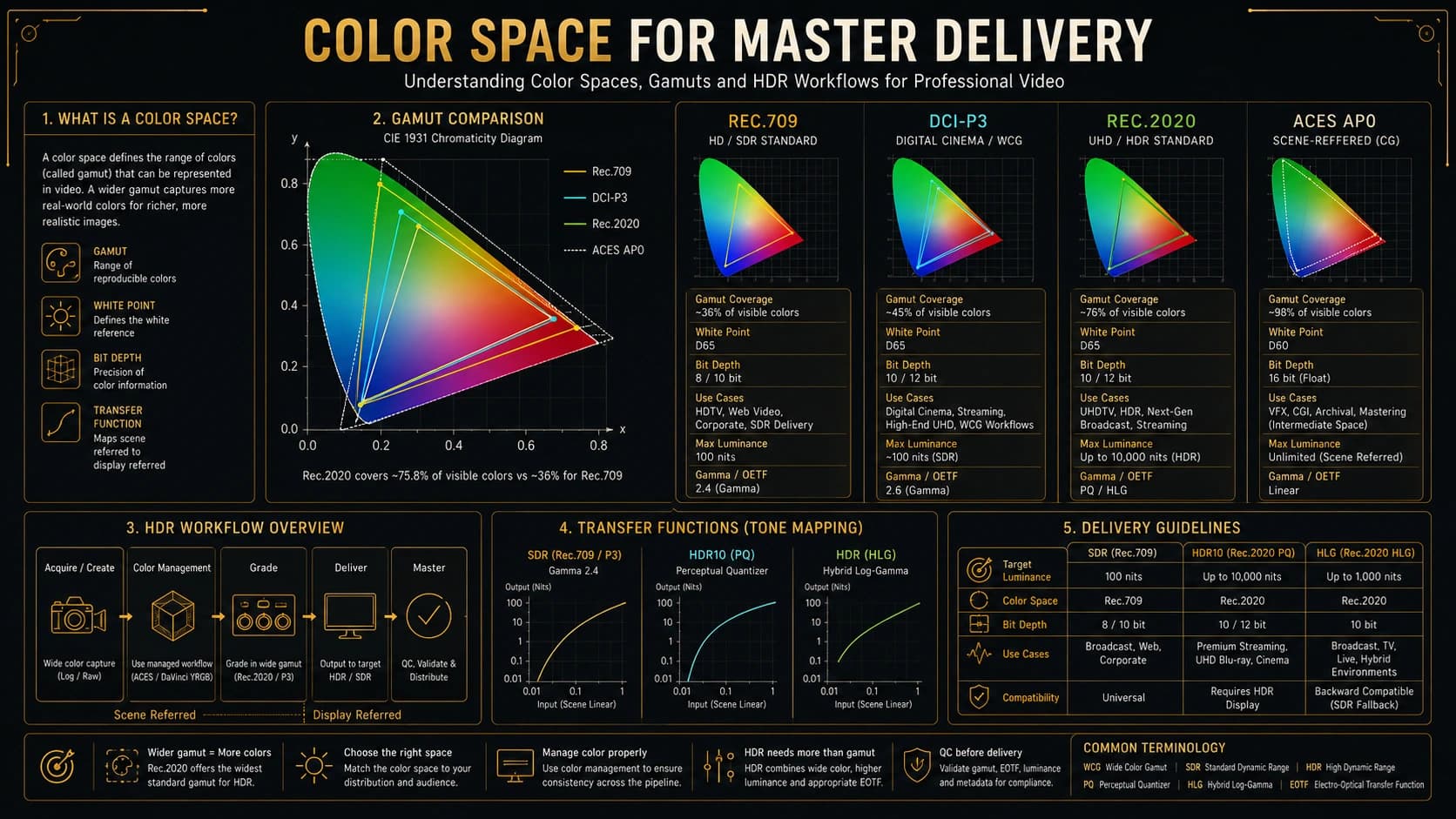
Color Space and Transfer Functions
Delivery language includes Rec.709, Rec.2020, DCI-P3, SDR, PQ, HLG, and HDR10 where relevant. Primaries, transfer characteristics, and matrix coefficients must agree with monitoring and tags. Legal/video levels versus full/data levels matter. Incorrect tagging causes visible playback differences. Exporting a Rec.709 timeline as Rec.2020 does not create genuine HDR.
Broadcast Delivery
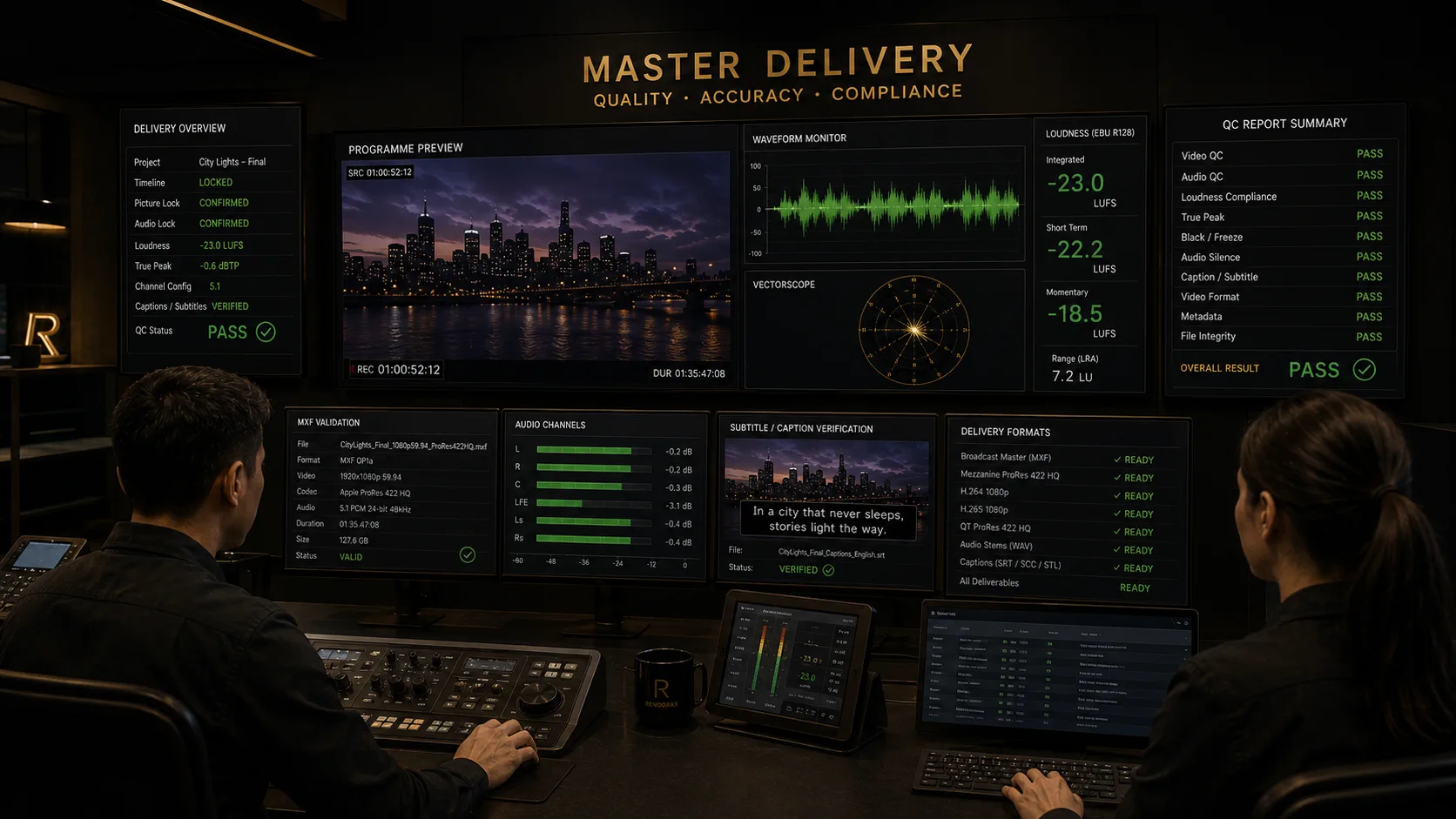
Every broadcaster publishes its own technical specification sheet. House formats, naming rules, audio maps, caption packages, and QC tolerances differ by region, channel, and even by programme strand. Treat the receiving broadcaster’s latest document as the only source of truth—never a generic blog preset.
Typical deliverables may include programme masters, textless masters, clean covers, promo versions, and language or access variants. House formats often specify MXF essence (XAVC, AVC-Intra, legacy XDCAM-class profiles where still required) or ProRes where explicitly accepted.
Naming, leaders, and picture safety
File naming conventions frequently encode series, episode, version, language, and date codes. Where required, clock, slate, bars, and countdown leaders must match duration and timecode rules. Safe title and safe action areas protect lower-thirds and graphics on overscan-prone displays. Legal colour limits (luma/chroma) prevent illegal broadcast levels.
Audio, captions, and manifests
Stereo versus 5.1 (and additional languages) must follow the sheet’s channel mapping. Loudness compliance is usually mandatory—see the LUFS guide. Caption deliverables may be embedded, sidecar, or both. Sidecar metadata and delivery manifests document what was uploaded and which checksums prove integrity.
Automated QC vs manual QC
Automated QC catches measurable faults: true peak, loudness windows, black frames, freeze frames, and some metadata errors. Manual QC catches narrative and craft failures: wrong slate text, awkward captions, soft focus that still “passes,” or a stereo fold-down that buries dialogue. Enterprise workflows use both.
OTT and Streaming Delivery
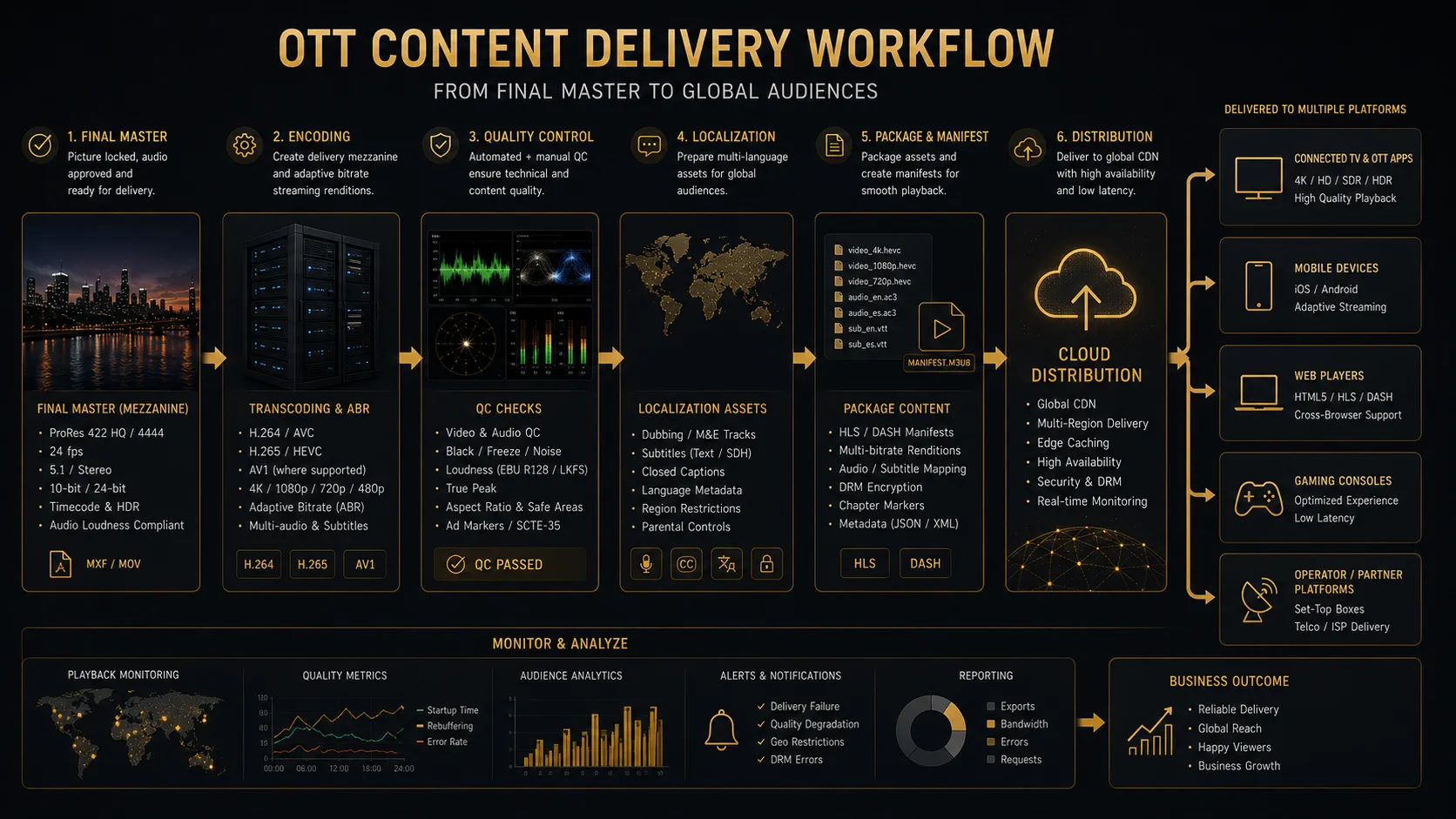
OTT finishing often starts from high-quality mezzanine masters or IMF packages, then produces H.264/H.265 adaptive bitrate ladders, audio tracks, localization, subtitle packages, HDR and SDR versions, artwork, and metadata. Distinguish source masters from consumer streaming encodes. See also Netflix Partner Help for an example of platform-specific packaging language.
IMF Explained
Definition
IMF (Interoperable Master Format)
IMF is a SMPTE/AMWA family of standards for packaging high-quality audiovisual masters as compositions of track files plus XML metadata. It is designed for versioning and localization without duplicating every media essence for every language or cut.
IMF was created so large content libraries could manage many versions—theatrical cuts, TV edits, languages, captions, and accessibility tracks—without rebuilding a single monolithic file for every change. The industry needed a mezzanine package that machines could validate and humans could extend.
Package structure
An IMF package is not “one .mov.” It is a set of components:
- Track files — picture, audio, subtitle, or other essence files (often JPEG 2000 for picture in many IMF applications)
- Composition Playlist (CPL) — the timeline that sequences track files into a playable version
- Packing List (PKL) — inventory of assets that belong to the package, with hashes for integrity
- Asset Map — maps logical asset IDs to physical filenames on disk or in storage
- Output Profile List (OPL) — where used, describes how a composition should be transformed for a particular output (for example a delivery encode path)
Supplemental packages, localization, and versioning
Supplemental packages add or replace tracks—new audio languages, caption sets, or picture replacements—without re-shipping the entire original media library. That is the enterprise advantage: versioning without duplicating unchanged essence. Localization teams deliver language and caption supplements that reference the original CPL structure.
IMF vs MXF vs ProRes masters
MXF is a container that may hold a single-programme broadcast master. A ProRes master is typically one mezzanine file (often in MOV) optimized for editing. IMF is a package ecosystem that can include MXF track files internally while managing compositions and supplements. Do not treat them as interchangeable labels.
| Approach | What it is | Strength | Limitation |
|---|---|---|---|
| IMF package | Composition + track files + maps | Versioning & localization reuse | More tooling complexity |
| MXF programme master | Single ingestable file/profile | Broadcast ingest familiarity | Less flexible for many versions |
| ProRes mezzanine | Edit-friendly essence file | Finishing speed & simplicity | Not a full versioning package |
IMF for OTT—and its limitations
Many premium OTT workflows accept or prefer IMF for original content pipelines because supplements scale. Limitations include steeper tooling requirements, profile fragmentation across platforms, and the fact that IMF does not remove the need for QC, loudness compliance, or caption accuracy. IMF is infrastructure—not a substitute for craft or specification reading.
SMPTE and AMWA documentation define the family of standards; destination profiles decide which subset you must implement.
Audio Export Requirements
Confirm sample rate, bit depth, PCM layout, stereo/mono/5.1/7.1, Dolby Atmos where required, channel ordering, loudness and true peak, dialogue consistency, M&E, stems, audio description, and separate language versions. For loudness practice, see Broadcast Audio: Surviving the LUFS Standard.
Captions, Subtitles and Localization
Delivery may call for embedded or sidecar captions (SRT, WebVTT, SCC, TTML, IMSC, STL where relevant), forced narrative, SDH, closed captions, burned-in text, textless backgrounds, dubbed audio, and M&E. Exact formats depend on the receiving platform or broadcaster— and on localization packaging rules.
Export Workflow
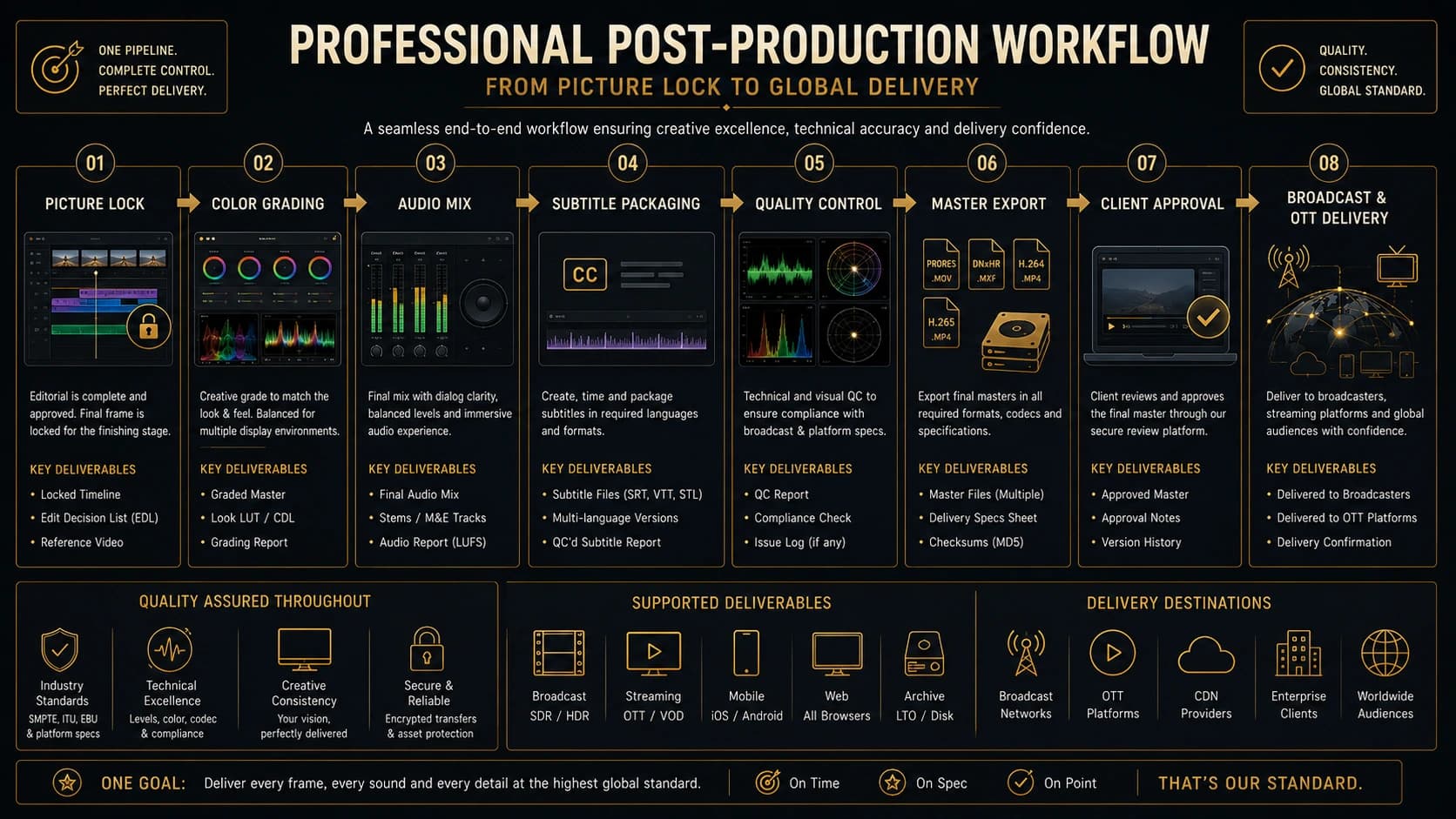
A resilient professional path runs: Picture Lock → Conform and Cleanup → Color Finish → Audio Mix and Loudness Check → Graphics and Text Verification → Subtitle and Caption Packaging → Master Export → Automated QC → Human QC → Client or Broadcaster Approval → Delivery → Archive.
- Picture Lock
- Color
- Audio
- Captions
- QC
- Export
- Approval
- Delivery
- Archive
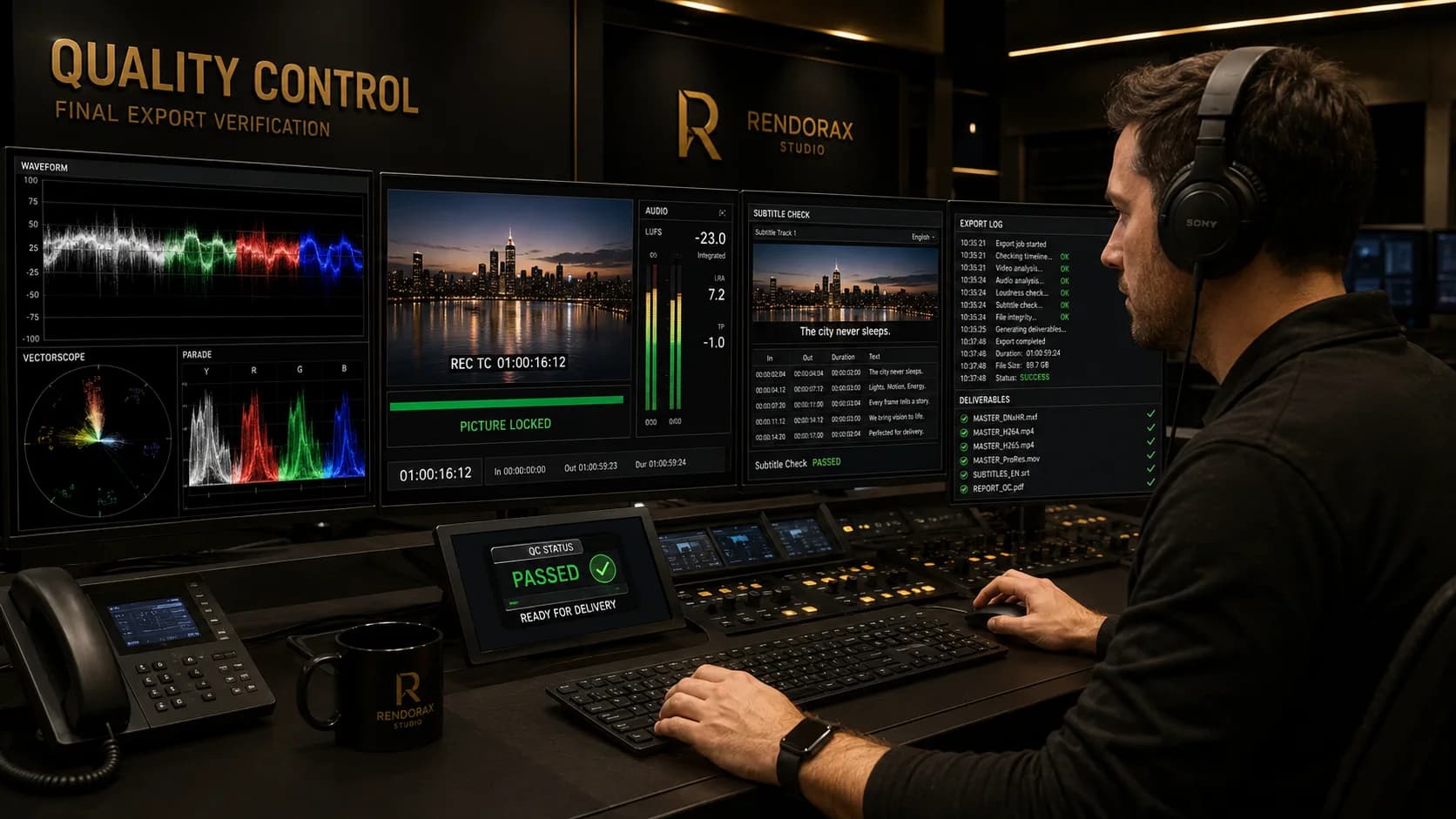
Quality Control Before Delivery
QC proves the package is delivery-safe end to end. Combine automated checks with human review. See also Rendorax quality control services.
Picture failures
- Black / flash / frozen frames — Often leftover handles, failed renders, or dropped frames. Detect with auto QC and full-duration play. Prevent with pre-export timeline scrub and render verification.
- Wrong field order or frame rate — Caused by mismatched project and delivery settings. Detect via metadata tools and motion inspection. Prevent by locking delivery frame rate at picture lock.
- Compression artifacts & banding — Over-aggressive encodes or 8-bit grades. Detect on calibrated displays and scopes. Prevent with proper mezzanine bit depth before distribution encodes.
- Color shifts & illegal luma — Wrong tags, levels, or monitoring. Detect with waveform/vectorscope and tagged players. Prevent with consistent colour management and legal-limit checks.
Audio failures
- Clipping / true-peak failure — Limiters set on sample peak only. Detect with true-peak meters on the final bounce. Prevent with true-peak aware limiting.
- LUFS failure — Wrong target or ungated measurement. Detect with BS.1770 meters. Prevent by matching the named standard on the sheet.
- Wrong channel order / missing center — Layout mismatches in 5.1. Detect with channel ID tones and layout inspection. Prevent with documented channel maps.
- Out-of-sync dialogue / missing M&E — Slip after conform or incomplete stem exports. Detect with full-duration A/V sync checks. Prevent with stem checklists before packaging.
Subtitle failures
- Timing drift / missing captions — Frame-rate mismatch or incomplete language packages. Detect by spot-checking against picture TC. Prevent with locked frame rate and package manifests.
- Encoding & line-length issues — Wrong character encoding or overly long lines. Detect in caption QC tools and on-screen review. Prevent with style guides and validation scripts.
Packaging failures
- Wrong filename or metadata — Manual renaming errors. Detect against the naming matrix. Prevent with automated naming templates.
- Missing subtitle / audio tracks — Incomplete package assembly. Detect via PKL/manifest vs checklist. Prevent with package gatekeeping before upload.
- Wrong aspect / incorrect runtime — Reframes or handle mistakes. Detect with duration/TC and raster inspection. Prevent with locked delivery timeline and slate verification.
Common Export Mistakes
- Choosing format by file extension alone
- Exporting directly from an unverified timeline
- Using H.264 as the only archival master
- Incorrect frame rate or field order
- Wrong Rec.709 levels or tags
- 8-bit export after a high-quality grade
- Incorrect channel mapping or missing captions
- Unsupported codec/container combinations
- Wrong naming convention
- Skipping full-playback QC
- Assuming upload success means technical acceptance
Choosing the Right Delivery Format
Decide from destination, required specification, editing or playback purpose, quality priority, file-size limits, color requirements, audio layout, caption requirements, archive needs, and future versioning. When unsure, produce a compliant mezzanine first, then derive distribution encodes.
Professional Delivery Checklist
Picture
- Raster & aspect
- Frame rate & scan
- Duration / TC
- No black/flash/freeze
Color
- Primaries & transfer
- Legal vs full
- Scopes & tags
- HDR/SDR versions
Audio
- Layout & order
- Loudness / TP
- Sync
- Stems / M&E
Captions
- Format required
- Forced / SDH
- Spelling
- Textless
Metadata
- Naming
- IDs / versions
- Sidecars
- Language codes
Packaging
- Container/codec
- IMF/CPL if any
- Checksums
- Manifest
QC
- Auto + human
- Full-duration play
- Logs retained
- Sign-off
Transfer & archive
- Secure upload
- Receipt confirmed
- Archive master
- Restore test
Rendorax Studio Master Delivery Workflow
Rendorax Studio supports picture-lock control, broadcast finishing, OTT mastering, color and audio compliance, caption packaging, localization, structured QC, version approval, master delivery, delivery tracking, secure archive workflows, and client review collaboration.
Conclusion
The right master is determined by destination requirements—not by one universally “best” export preset. Choose the mezzanine that protects quality, the delivery profile that passes ingest, and the QC discipline that proves both.
FAQ
What is the best format for a video master?
There is no single best format. The correct master is defined by the receiving party’s current specification—broadcast, OTT, agency, or archive—plus your need for future reversioning.
Is ProRes better than H.264?
ProRes is typically better as an editing or mezzanine master because it is lightly compressed and responsive in finishing workflows. H.264 is usually better as a distribution encode for playback and upload constraints. They serve different jobs.
Is MXF a codec or a container?
MXF is a container (file wrapper). The picture and audio essence inside may be XAVC, AVC-Intra, DNx, JPEG 2000, or another codec allowed by the delivery profile.
What is the difference between UHD and DCI 4K?
UHD is commonly 3840×2160. DCI 4K is 4096×2160. They are related but not identical rasters, and delivery specs often treat them separately.
Should an archive master be compressed?
Most archives use lightly compressed mezzanine codecs (for example ProRes or DNxHR families) rather than heavy long-GOP distribution encodes. Exact policy depends on storage, retention, and re-use requirements.
What is IMF used for?
IMF (Interoperable Master Format) packages high-quality track files with composition and packing metadata so versions, languages, and captions can be managed without rebuilding a single monolithic file every time.
What format do broadcasters require?
Whatever their current technical delivery specification states—often MXF-based profiles, sometimes ProRes or other accepted mezzanines, with defined audio, captions, naming, and QC rules. Always confirm the channel document.
What format should be delivered to an OTT platform?
Many platforms want a high-quality mezzanine or IMF package plus localization assets; others accept ProRes or platform-specific packages. Consumer H.264/H.265 encodes are usually derivatives, not the source master.
Why does an exported video look different from the timeline?
Common causes include incorrect color tags or levels, gamma/transfer mismatches, monitoring differences, compression, limited bit depth, or viewer color management. Re-check tags, scopes, and a calibrated reference.
Should captions be embedded or supplied separately?
Follow the destination. Some workflows want sidecar files (SRT, WebVTT, IMSC, SCC, and others); some require embedded streams; some need both. Burned-in text is a creative or accessibility decision, not a universal default.
Is H.265 suitable for editing?
H.265 can play and sometimes edit, but it is generally a poor mezzanine choice compared with ProRes or DNxHR for finishing, grading, and repeated rendering. Prefer a mezzanine for editorial work.
Why must the entire exported master be checked?
Errors can appear late—black frames, sync drift, caption failures, true-peak overs, or metadata mistakes. Spot-checking the first minute does not prove the full duration is delivery-safe.
References and Further Reading
- ITU — Radiocommunication and media standards hub
- EBU Technology & Innovation
- SMPTE — Professional media standards
- AMWA — Advanced Media Workflow Association (IMF ecosystem)
- Apple — About Apple ProRes
- Avid — DNxHR and DNxHD
- Netflix Partner Help
- Dolby Professional
- Adobe Premiere Pro — Exporting overview
- Blackmagic Design — DaVinci Resolve
Platform and broadcaster requirements change. Always verify the current receiving-party specification before mastering.
Related reading: Archival Restoration: Rescuing Legacy Footage