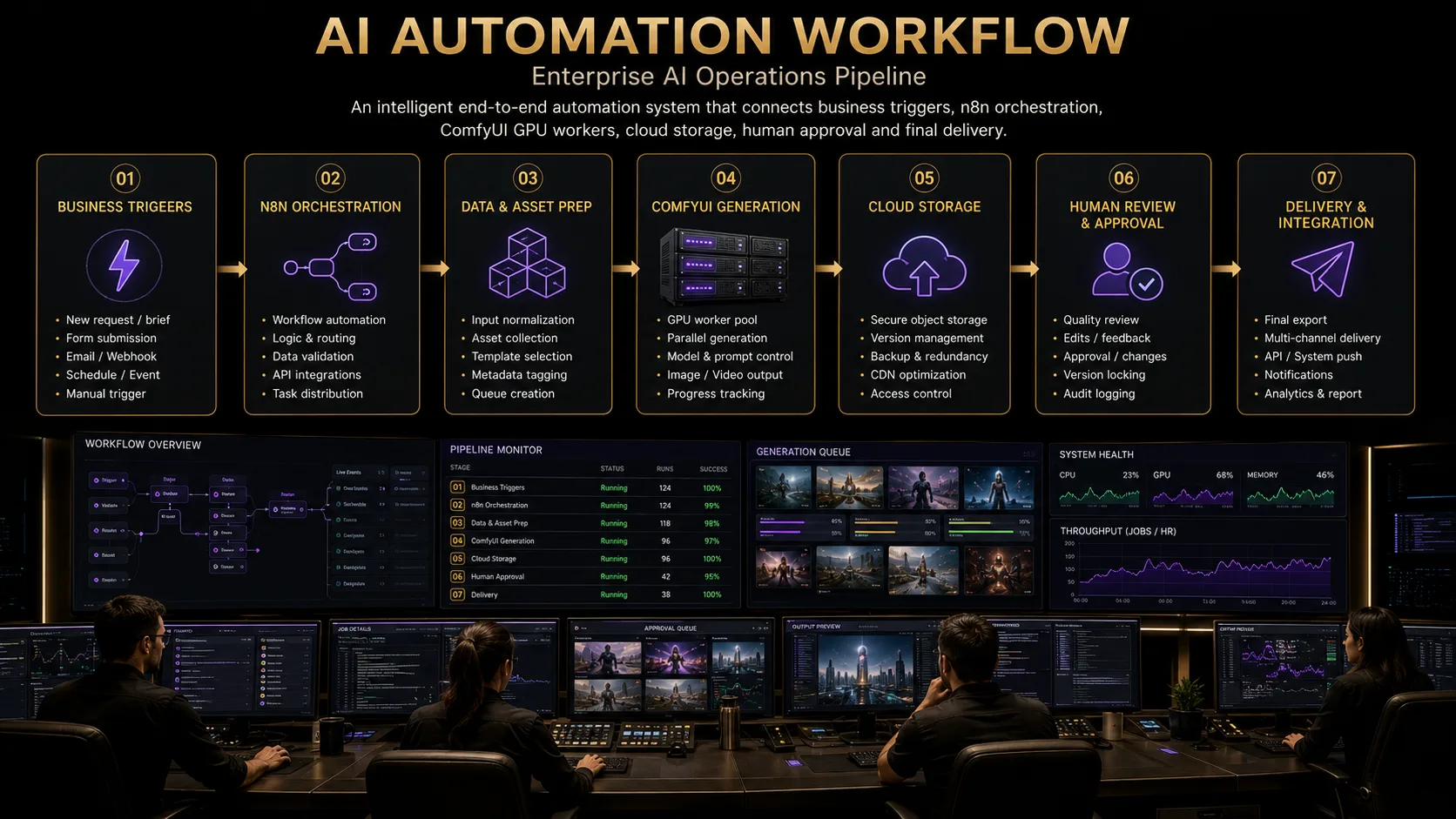
Connecting n8n to ComfyUI is more than posting a single HTTP request and hoping an image appears. A production pipeline also needs validation, queueing, state tracking, storage, retries, idempotency, security, human approval, monitoring, delivery, and auditability. Without those layers, demos work—and client campaigns fail under load, retries, and review pressure.
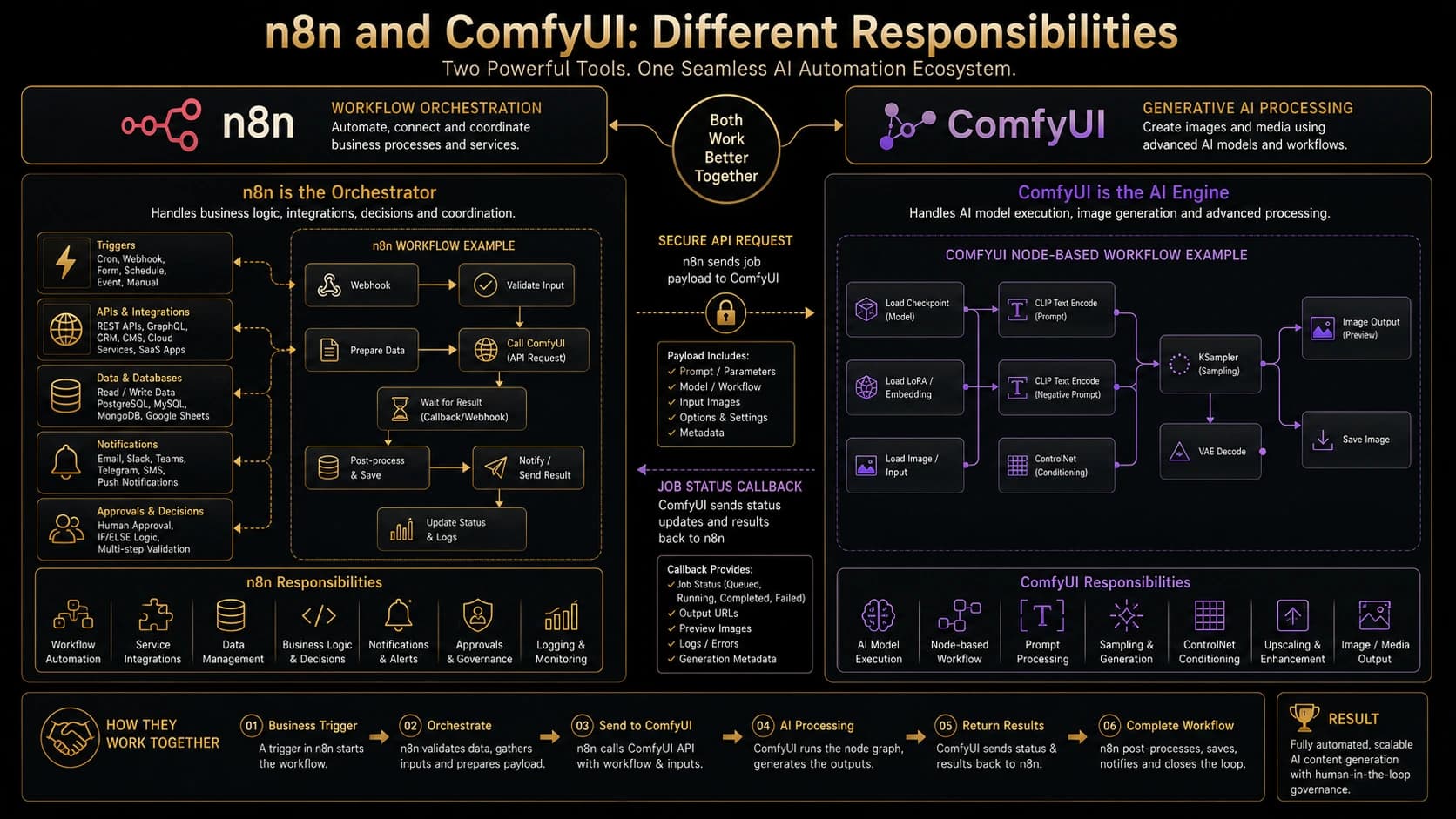
ComfyUI executes models and node graphs. n8n orchestrates the surrounding business workflow: triggers, credentials, databases, notifications, and approval gates. Treat them as complementary systems, not interchangeable tools.
What Are n8n and ComfyUI?
n8n
Definition
n8n
n8n is a workflow orchestration platform. It connects triggers, APIs, databases, and human steps into repeatable automation graphs. It is not a diffusion or model-execution engine.
In production creative ops, n8n typically owns webhooks and schedules, API integrations, branching logic, validation, database writes, notifications, human-approval waits, credential vaults, and error workflows. That is the business control plane around generation.
Definition
Workflow orchestration
Workflow orchestration coordinates steps across systems—when to validate, when to enqueue GPU work, when to notify reviewers, and when to deliver. It tracks process state; it does not replace model inference.
ComfyUI
Definition
ComfyUI
ComfyUI is a node-based interface and runtime for generative AI workflows. Graphs define model loading, conditioning, sampling, ControlNet, LoRA, upscaling, and output-file generation. It is not your CRM, ticket system, or approval router.
Teams export workflow JSON, attach models and custom nodes, and submit graphs through an API for image generation and—where configured—video or enhancement-related node chains. ComfyUI’s strength is flexible graph execution on GPU workers.
n8n vs ComfyUI: Different Responsibilities
Keep the boundary explicit. Confusion here creates fragile pipelines where business logic is buried inside custom nodes—or GPU work is triggered without validation and audit trails.
n8n
- · Triggers
- · APIs
- · Validation
- · Orchestration
- · Database
- · Notifications
- · Approvals
ComfyUI
- · Models
- · Nodes
- · Sampling
- · Conditioning
- · ControlNet
- · Upscaling
- · Generation
- · Output
| Capability | n8n | ComfyUI |
|---|---|---|
| Trigger handling | Yes | No (receives jobs) |
| Validation | Yes | Limited / graph-level |
| Business logic | Yes | No |
| API integrations | Yes | Via nodes / limited |
| Database access | Yes | Not primary role |
| Notifications | Yes | No |
| Model execution | No | Yes |
| Sampling | No | Yes |
| ControlNet | No | Yes |
| Upscaling | Orchestrates only | Yes |
| Output rendering | Moves / stores | Generates |
| Approval workflows | Yes | No |
| Monitoring | Orchestration metrics | Worker / queue metrics |
Why Combine n8n and ComfyUI?
Together they support structured business triggers, repeatable generation, dynamic prompts, batch processing, automated file movement, client approvals, localization variants, retries, metadata tracking, production observability, and multi-channel delivery.
The combination is appropriate when generation sits inside a larger operation: briefs, brands, locales, reviewers, and deliveries. A simpler direct script may be enough for a single operator experimenting on one workstation with no queue, no client SLA, and no audit requirement.
Production Architecture Overview
A durable shape looks like this: Trigger → n8n orchestrator → validation → job queue → ComfyUI GPU worker → object storage → metadata database → human approval → delivery.
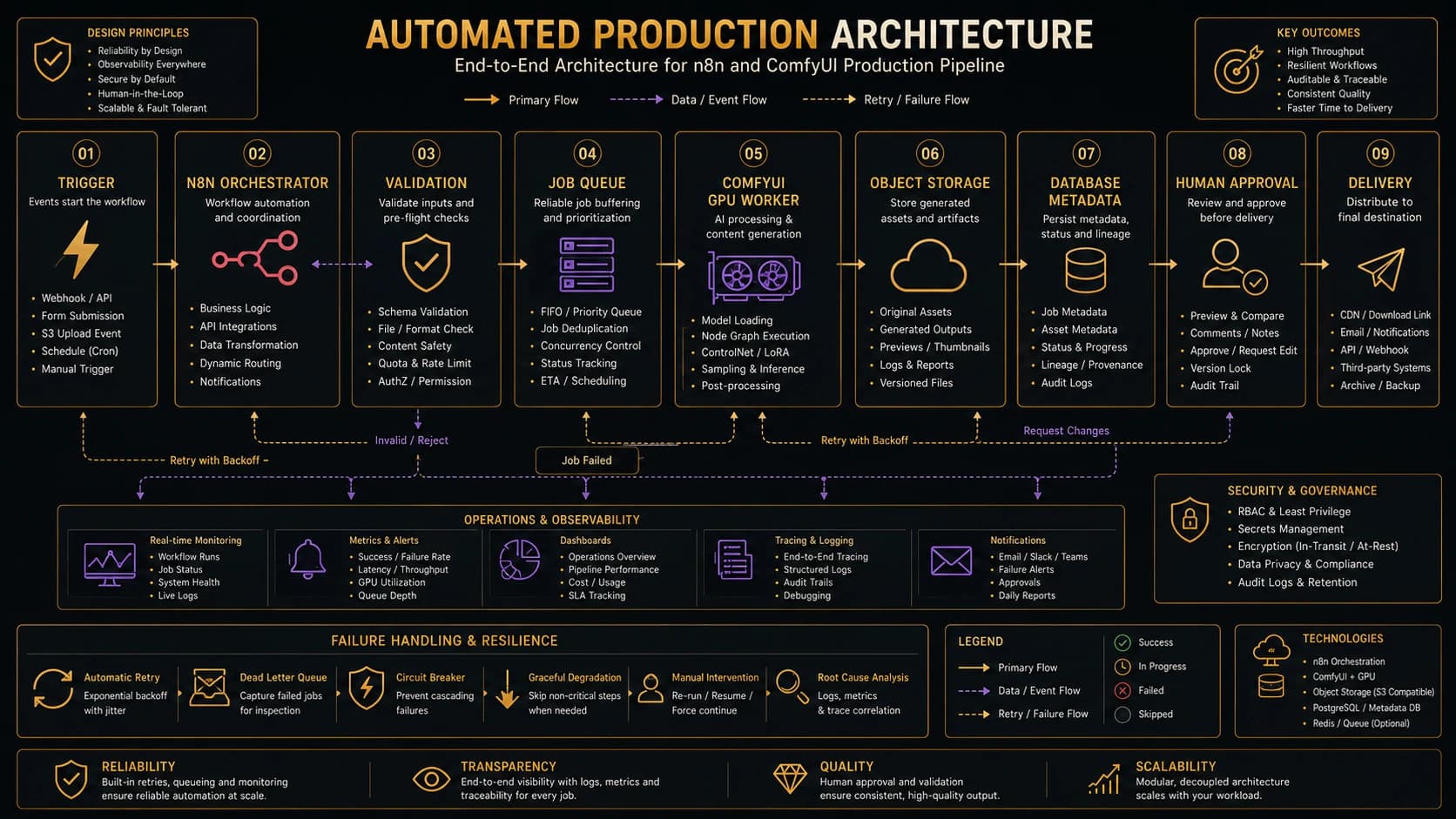
Trigger sources include webhooks, forms, CRMs, schedules, and internal APIs. Validation is the boundary that rejects bad payloads before GPU time is spent. Queue ownership should sit in front of workers so capacity is explicit. Workers stay isolated so a bad custom node or OOM event does not crash the orchestrator. Temporary storage holds processing scratch; permanent object storage holds deliverables. Metadata persistence records job state. Approval state gates delivery. Final delivery publishes the approved asset version to the correct destination.
Calling ComfyUI from n8n
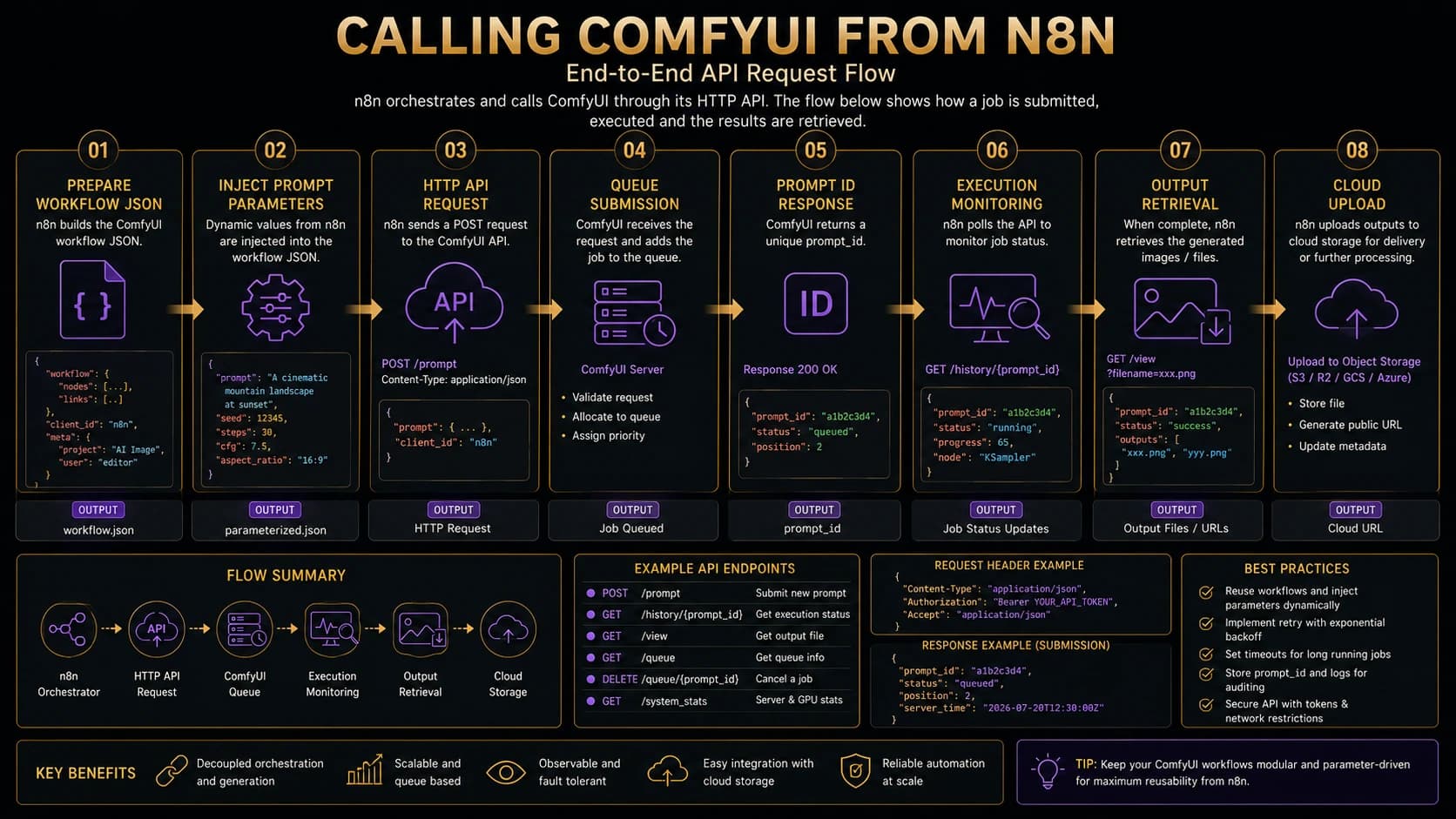
A complete request flow usually follows these steps: load a versioned workflow JSON; inject validated parameters; upload or reference input assets; submit the prompt; receive a prompt ID; track execution; retrieve output metadata; download or move outputs; store permanent assets; update job state; notify reviewers.
Definition
Prompt ID
A prompt ID is the correlation key returned when ComfyUI accepts a submitted workflow. Orchestrators store it on the job record and use it to inspect queue state, history, and generated outputs.
Many deployments expose a /prompt submission path, queue inspection, history retrieval, and output file access. Some also support WebSocket progress events. API details are not identical across every ComfyUI version, custom fork, or wrapper. Always verify the behavior of the instance you deploy.
Workflow JSON and Node Mapping
Definition
ComfyUI workflow JSON
ComfyUI workflow JSON describes nodes, class types, inputs, and links in a form the API can execute. It is related to—but not always identical in convenience to—the visual editor experience.
Production graphs depend on stable node IDs, class types, typed inputs, output references, and parameter injection points. Templates need validation, version control, and an inventory of custom nodes and model-path dependencies. Missing nodes or models fail at runtime, not at design time on another machine.
Dynamic Prompt Construction
n8n can assemble prompts from a client brief, brand rules, product metadata, campaign information, locale, aspect ratio, output dimensions, negative prompts, model selection, LoRA selection, seed policy, and quality presets. Sanitize and length-limit every field before injection.
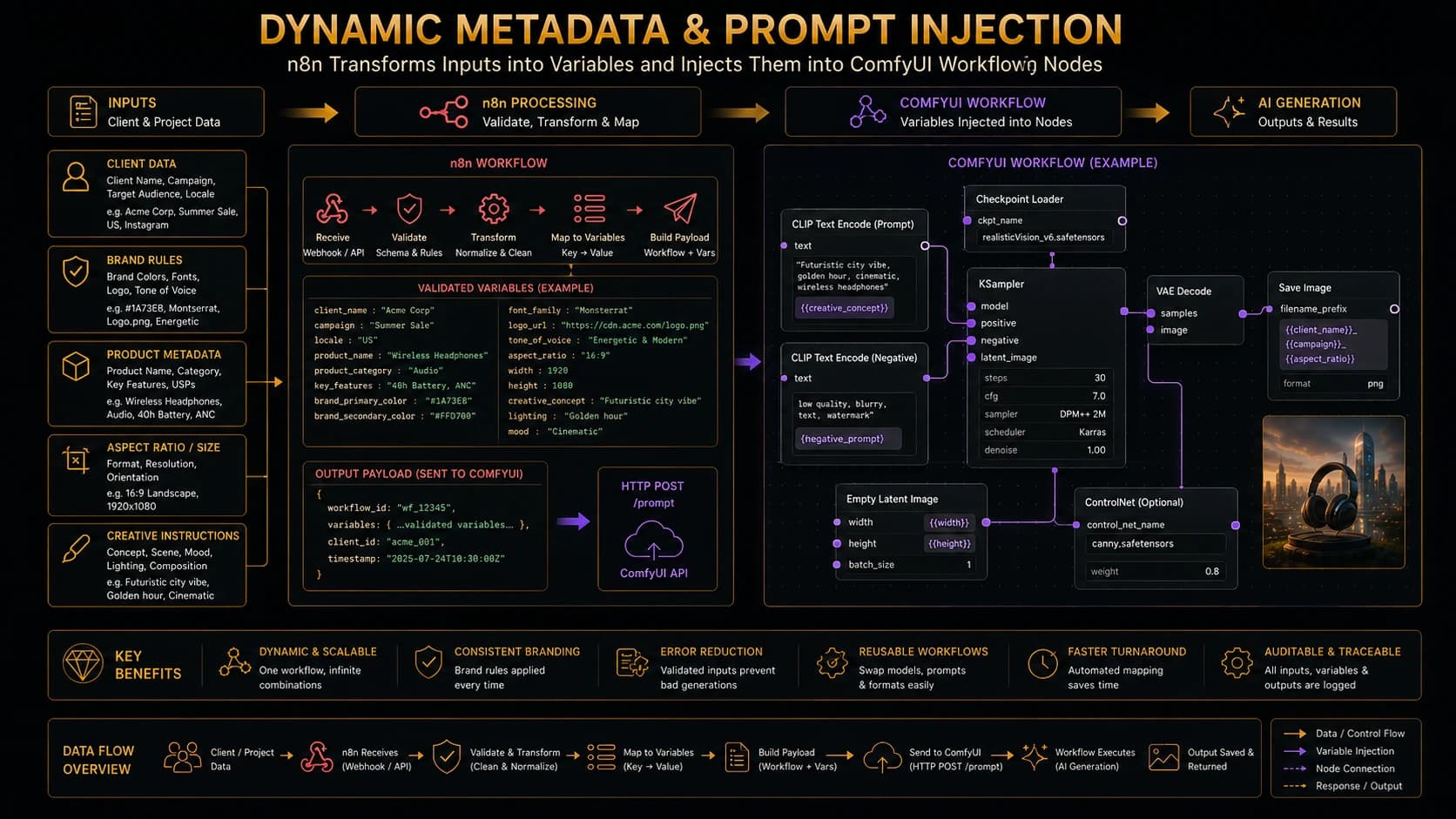
Direct unvalidated user input should not be injected into arbitrary nodes. Map only allow-listed fields into known inputs. Example contract in prose: nodes["42"].inputs.text = sanitize(brief.positivePrompt), nodes["55"].inputs.width = allowedWidths[aspect], and reject the job if the aspect key is unknown.
// Safe mapping sketch (illustrative)
const mapping = {
  positive: "42",
  negative: "43",
  width: "55",
  height: "55",
  seed: "60",
};
assertWorkflowVersion(template, "product-hero@3.2.0");
inject(template, mapping.positive, sanitize(brief.prompt));
inject(template, mapping.width, dims.width);
inject(template, mapping.height, dims.height);
Queueing and Job Management
Uncontrolled bursts against a GPU worker are fragile. Production queues need FIFO or priority policies, concurrency limits, per-worker capacity, GPU memory awareness, back-pressure, depth monitoring, timeouts, cancellation, retry eligibility, dead-letter handling, and manual recovery paths.
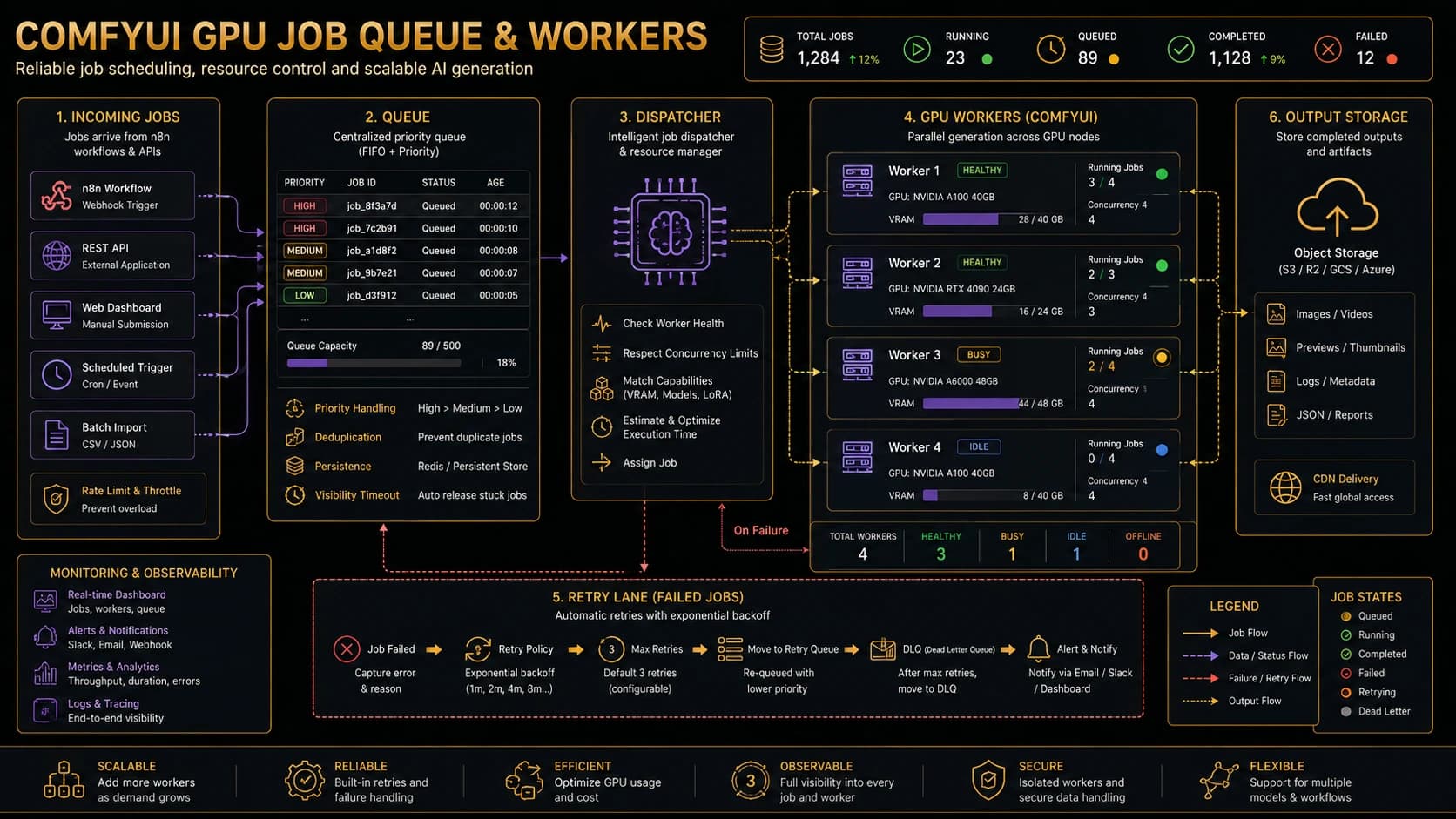
Definition
GPU worker
A GPU worker is a dedicated machine or container that runs ComfyUI (and required models/custom nodes) to execute generation jobs. It should be health-checked, capacity-labeled, and isolated from the public internet.
Distinguish three queues: the workflow/orchestration wait states inside n8n, ComfyUI’s local execution queue on a worker, and an external production job queue that schedules across workers. Do not assume ComfyUI’s local queue alone provides enterprise-grade scheduling.
Job State Machine
Normal states: RECEIVED → VALIDATED → QUEUED → RUNNING → OUTPUT_READY → QC_PENDING → APPROVED → DELIVERED. Alternate states: RETRYING, FAILED, CANCELLED, MANUAL_REVIEW. Allow only documented transitions. Record timestamps and append-only audit history for every change.
- RECEIVED
- VALIDATED
- QUEUED
- RUNNING
- OUTPUT_READY
- QC_PENDING
- APPROVED
- DELIVERED
Alternate states
- RETRYING
- FAILED
- CANCELLED
- MANUAL_REVIEW
Polling vs WebSocket or Callback Patterns
Polling is operationally simple. WebSocket monitoring can reduce latency when your deployment supports it. Callback or webhook wrappers can push completion events into n8n—but those are usually your integration layer, not a universal ComfyUI guarantee. Hybrids are common: poll as a safety net while listening for events.
| Factor | Polling | WebSocket / events | Callback wrapper |
|---|---|---|---|
| Complexity | Low | Medium | Medium–high |
| Latency | Higher | Lower | Low |
| Request volume | Higher | Lower | Low |
| Recovery | Easy to resume | Needs reconnect logic | Needs retry + idempotency |
| Scaling | Straightforward | Connection management | Depends on wrapper |
| Best use | Most studio pipelines | Interactive progress | When you own the bridge |
Idempotency and Duplicate Prevention
Definition
Idempotency key
An idempotency key uniquely identifies a logical generation request so retries do not create duplicate GPU work or duplicate deliveries. Store it with a unique database constraint and resolve collisions by returning the existing job.
Duplicates appear from webhook retries, double submissions, n8n retry behavior, timeouts after successful submission, network disconnects, manual re-execution, and queue redelivery. Defend with idempotency keys, request hashes, unique constraints, prompt-ID mapping, existing-job lookup, safe retry boundaries, and delivery deduplication.
Practical key material (no secrets): client/project ID + workflow version + input asset version + upstream request ID. Example: proj_1842:product-hero@3.2.0:asset_v7:req_9f31.
Error Handling and Retry Strategy
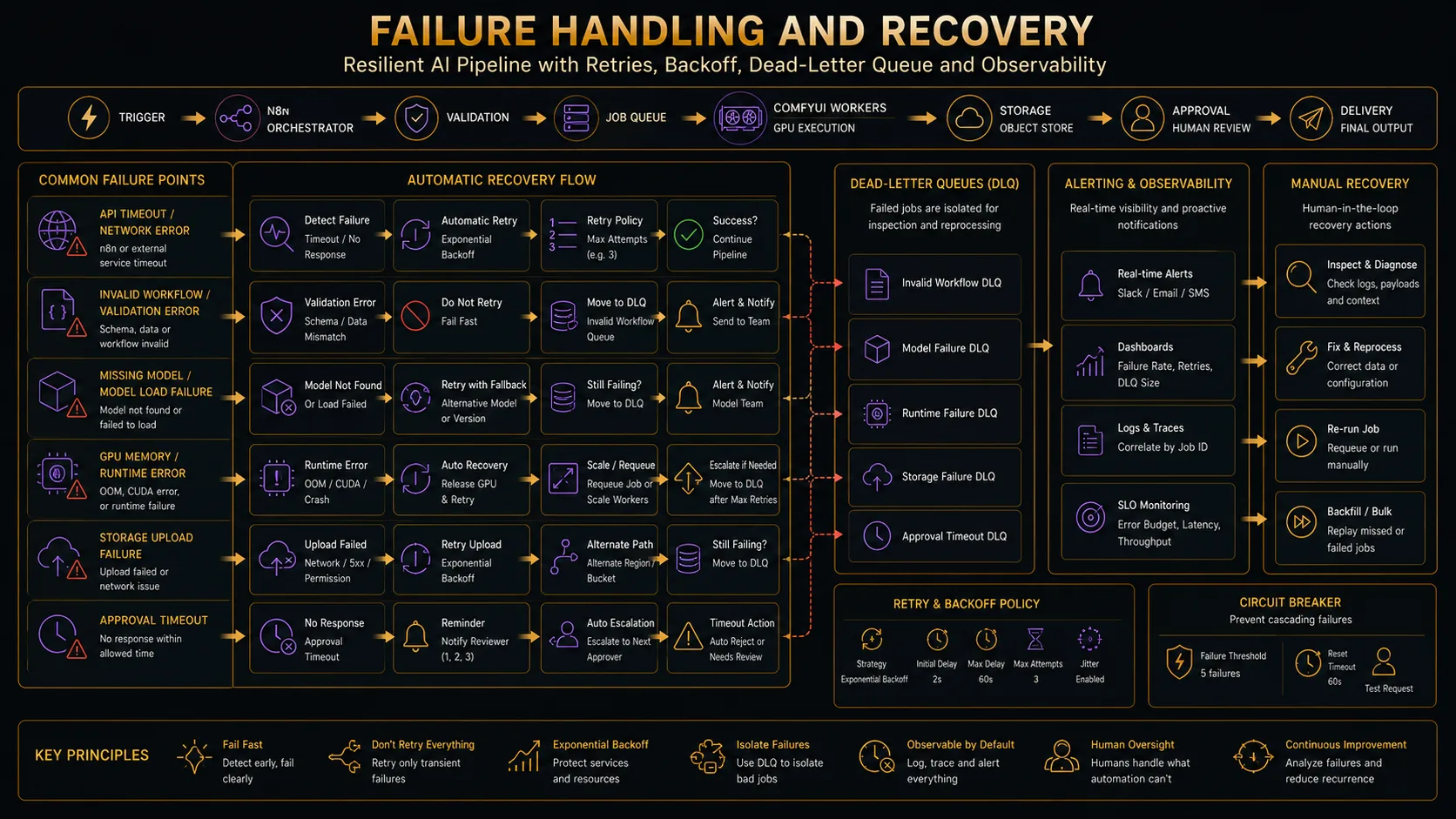
- Attempt 1
- Short delay
- Attempt 2
- Exponential backoff
- Attempt 3
- Dead-letter queue
- Manual recovery
Validation errors should normally not retry. Retry only failures that are transient and safe to re-run under an idempotency key.
Validation failures
Missing fields, invalid dimensions, unsupported file types, and missing workflow mappings should fail fast—no retry. Alert the submitter and route to MANUAL_REVIEW only when a human can fix the payload.
API failures
Timeouts, connection refused, authentication failures, and invalid responses need classification. Transient network errors may retry with exponential backoff. Auth failures should stop and alert ops—not spin.
ComfyUI failures
Missing models, missing custom nodes, invalid workflows, CUDA OOM, node execution failures, and corrupted inputs often need workflow or capacity fixes. OOM may retry once on a larger GPU class; identical blind retries on the same worker usually waste money.
Storage and approval failures
Upload timeouts and permission errors may retry within limits. Signed URL expiration needs regeneration, not silent reuse. Object-name collisions need naming policy fixes. Expired reviews, inactive reviewers, and conflicting approval states escalate—do not auto-approve.
Definition
Dead-letter queue
A dead-letter queue holds jobs that exhausted safe retries. Operators inspect them, fix root causes, and re-queue deliberately. Infinite retries are not a strategy.
File and Asset Handling
Separate input uploads, temporary processing files, generated outputs, and permanent delivery assets. Enforce naming conventions, checksums, content types, metadata, version relationships, retention policies, and cleanup jobs.
A practical Rendorax-aligned pattern: Supabase stores job and asset metadata; Cloudflare R2 stores large generated media; signed URLs provide secure access; temporary processing paths stay distinct from final deliverables; project/job/asset associations and version history remain queryable.
Database and Metadata Tracking
Useful job metadata includes job ID, request ID, idempotency key, project/client, workflow version, prompt version, model, LoRA, seed, input assets, output assets, status, retry count, worker ID, start/end timestamps, approval status, delivery status, error code, and cost estimate. That record is what makes generation auditable and reproducible months later.
Human-in-the-Loop Approval
Definition
Human-in-the-loop
Human-in-the-loop means automated generation pauses for authorized review before delivery. Reviewers can approve, reject, request revision, regenerate, adjust prompts, compare versions, or select a preferred output.
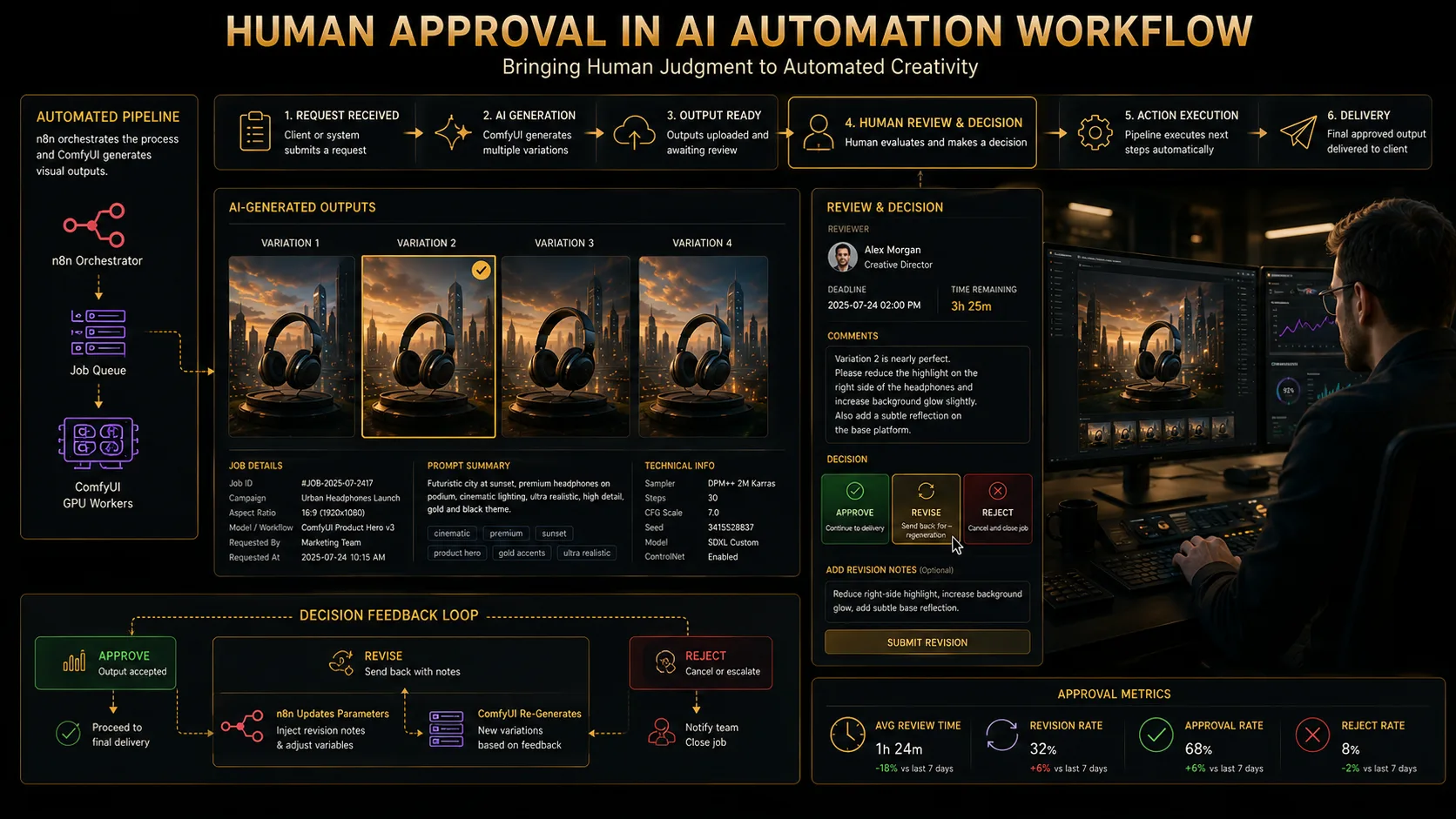
Secure approval tokens, enforce reviewer permissions, expire review links, keep decision history, support multiple reviewers with a defined final approver, and escalate on timeout. In studio platforms like Rendorax Studio, this maps naturally to review and approval workflows around project assets—without claiming every AI generation feature is already live.
Monitoring and Observability
Definition
AI pipeline observability
AI pipeline observability tracks technical health and business outcomes: queue depth, wait time, generation duration, end-to-end latency, GPU utilization and memory, failure and retry rates, approval time, cost per generation, storage usage, and delivery success.
Separate technical logs, business events, user-facing status, and audit history. Alert on queue depth, worker health, GPU memory pressure, elevated failure rates, and stalled approvals. Do not expose raw internal stack traces to clients.
Security Considerations
Cover reverse proxies, authentication, private networking, API gateways, IP restrictions where appropriate, secret storage, n8n credentials, signed URLs, input validation, file-type and size limits, execution limits, rate limiting, custom-node risk, model provenance, malware scanning where appropriate, retention, tenant isolation, and prompt/asset confidentiality. Never ship insecure default credentials in documentation or templates.
Scaling ComfyUI Workers
Start with a single GPU worker, then move to multiple workers behind a shared queue with capability labels, model affinity, warm models, health checks, draining, and hybrid cloud/on-prem pools. Different workflows may need different GPU classes. Shared object storage and centralized metadata simplify horizontal growth.
Shared job queue
Object storage + metadata database
Route by capability labels and health checks. Drain unhealthy workers before removing them from the pool.
Cost and GPU Utilization
Cost drivers include GPU runtime, idle reservation, cold start, model loading, batch size, resolution, steps, upscaling, retry waste, storage, egress, and human review time. Control them with batching, autoscaling, scheduling, queue priorities, preview-vs-final quality tiers, and cost-aware routing. Avoid universal cost figures—hardware and cloud prices change constantly.
Real-World Pipeline Examples
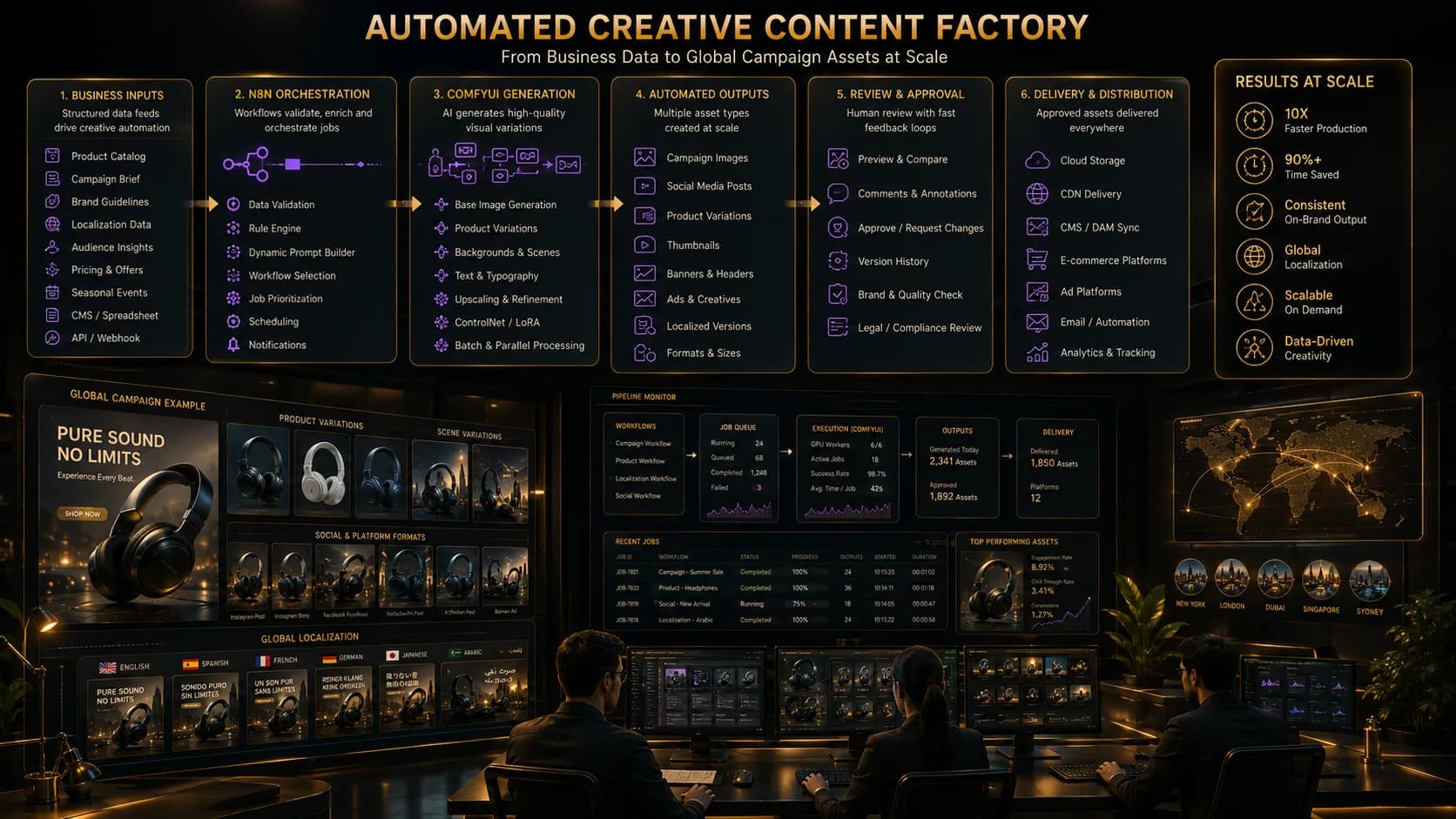
Product image pipeline
Brief → product metadata → prompt construction → generation → background cleanup → human approval → delivery.
Social campaign variants
Campaign brief → multiple aspect ratios → locale variations → generation → brand checks → approval → platform delivery.
YouTube thumbnail pipeline
Video metadata → title concepts → image generation → face/product composition → review → final export. Pair creative QC with delivery discipline from the master export guide.
Localization pipeline
Master creative → locale metadata → translated copy → regional prompt rules → generation → human language review → delivery. See also localization services.
Storyboard and concept frames
Script or treatment → shot extraction → prompt templates → generation → director selection → version archive. Editorial language still matters—see types of cuts in video editing.
Enhancement and upscaling
Source asset → validation → restoration workflow → upscaling → QC → approval → archive. QC discipline parallels quality-control practice.
Automated post-production asset preparation
Project request → reference assets → AI-generated concepts or supporting graphics → review → selected assets linked to the production project. Audio delivery for finished programs still follows standards such as the broadcast LUFS guide.
Common Failure Modes
| Failure | Likely cause | Detection | Prevention | Retry? | Manual action |
|---|---|---|---|---|---|
| Duplicate job | Webhook/n8n retry | Idempotency collision | Unique keys | No | Return existing job |
| Invalid workflow | Broken JSON / nodes | Submit/history error | Version tests | No | Fix template |
| Node ID mismatch | Graph rewired | Injection/validation fail | Named mappings | No | Update contract |
| Missing model | Worker not provisioned | ComfyUI error | Model inventory | Maybe other worker | Install / route |
| Missing custom node | Image drift | Import/runtime error | Pinned images | No | Rebuild worker |
| CUDA OOM | VRAM exceeded | Worker logs | Capacity labels | Larger GPU once | Reduce graph load |
| Queue overload | Burst traffic | Depth metrics | Back-pressure | Defer | Scale / prioritize |
| Polling timeout | Long job / stall | Orchestrator timeout | Tuned limits | Status check first | Inspect worker |
| Output missing | Path/history mismatch | Empty artifacts | Assert outputs | Careful | Recover files |
| Storage upload fail | Network/ACL | Upload error | Retries + checksum | Yes (limited) | Fix credentials |
| Signed URL expired | TTL too short | 403/expired | Regenerate URLs | N/A | Re-issue link |
| Approval expired | Slow review | Token TTL | Escalation | No | Re-open review |
| Wrong project link | Bad metadata map | Audit mismatch | Strict associations | No | Relink asset |
| Metadata without asset | Partial write | Integrity check | Transactional steps | Repair job | Reconcile |
| Asset without DB row | DB write failed | Orphan scan | Two-phase commit pattern | Repair | Insert metadata |
Production Checklist
Workflow
- Versioned JSON templates
- Valid node mappings
- Model availability per worker
- Custom-node inventory pinned
Orchestration
- Validation before enqueue
- Idempotency keys
- Timeouts and bounded retries
- Dead-letter handling
Storage
- Temporary vs permanent separation
- Naming and checksums
- Signed URLs with rotation
- Retention and cleanup
Security
- Authentication and network isolation
- Secret management
- File limits and tenant boundaries
Monitoring
- Queue depth, worker health, GPU memory
- Errors, cost, and actionable alerts
Approval
- Reviewer permissions and version history
- Final approver and escalation
Delivery
- Correct destination and asset version
- Delivery status, audit trail, archive
Rendorax Studio Use Case
This architecture can support Rendorax-style flows: client request → brief validation → AI-assisted concept generation → asset generation → editor review → client review → approval → project asset linking → Cloudflare R2 delivery → Supabase metadata → version history → secure client access → production archive.
Distinguish carefully: current Rendorax architecture already centers on projects, review, R2 media, and Supabase metadata. An n8n + ComfyUI generation lane is a potential integration pattern for concept and supporting-asset automation—not a claim that every generative step is already a live product feature.
Conclusion
Reliable AI automation requires more than connecting two tools. The production system must coordinate orchestration, model execution, state, storage, security, approval, monitoring, and delivery. n8n and ComfyUI excel when each stays in its lane—and when the surrounding queue, metadata, and human judgment are treated as first-class infrastructure.
FAQ
Can n8n run ComfyUI workflows?+
n8n does not execute diffusion models itself. It orchestrates business logic and can submit ComfyUI workflow JSON to a ComfyUI API endpoint, then track status, store outputs, and continue downstream steps.
Does ComfyUI have an API?+
Yes. Common deployments expose HTTP endpoints for submitting prompts, inspecting queue/history, and retrieving outputs. Exact paths and behavior can vary by version, custom nodes, and wrappers—verify your deployed instance.
How does n8n send a workflow to ComfyUI?+
Typically by loading a versioned workflow template, injecting validated parameters into known node inputs, then POSTing to the ComfyUI prompt endpoint and storing the returned prompt ID against a job record.
What is a ComfyUI prompt ID?+
A prompt ID is the identifier returned when a generation job is accepted by ComfyUI. Orchestrators use it to correlate queue state, history, and output files for that specific submission.
How do I retrieve generated outputs?+
After execution completes, read history or output metadata for the prompt ID, download or copy the generated files from the worker or shared volume, then move them into permanent object storage and update job metadata.
Should n8n poll ComfyUI or use WebSocket events?+
Polling is simple and reliable for many studios. WebSocket monitoring can reduce latency when supported by your deployment. Hybrid approaches are common. Do not assume ComfyUI emits arbitrary business webhooks unless you add a wrapper.
How do I prevent duplicate AI-generation jobs?+
Use idempotency keys, unique database constraints, and lookup-before-submit logic. Treat webhook retries, n8n retries, and client double-clicks as expected events—not exceptions.
Can several ComfyUI workers share one queue?+
Yes, when you place an external production job queue in front of workers. ComfyUI’s local queue alone is not always enough for enterprise scheduling across heterogeneous GPUs.
How should generated media be stored?+
Keep temporary processing files separate from permanent deliverables. Persist large media in object storage (for Rendorax: Cloudflare R2) and keep job/asset metadata in a database (for Rendorax: Supabase), with signed URLs for secure access.
How do I handle CUDA out-of-memory errors?+
Treat OOM as a capacity or workflow-sizing failure. Reduce resolution/steps, route to a larger GPU class, serialize heavy jobs, or fail to manual review. Blind retries on the same overloaded worker often waste cost.
Is it safe to expose ComfyUI publicly?+
Generally no. Place ComfyUI behind authentication, private networking, or an API gateway. Validate inputs, limit file sizes, rate-limit submissions, and never publish raw GPU workers to the open internet.
Can a human approval step be added?+
Yes. Pause the pipeline after OUTPUT_READY, notify reviewers, record approve/reject/revise decisions with history, then resume delivery only after an authorized final approval.
How should ComfyUI workflows be versioned?+
Store workflow JSON as versioned templates with manifests for node mappings, required models, and custom nodes. Test before promoting. Do not silently mutate production templates mid-campaign.
Can n8n and ComfyUI automate video workflows?+
Where your ComfyUI graphs and custom nodes support video-related steps, orchestration can schedule them the same way as image jobs—still with queues, storage, QC, and approval around the GPU work.
What should be logged in a production pipeline?+
Log job IDs, idempotency keys, workflow versions, prompt IDs, worker IDs, timings, retry counts, error codes, approval decisions, and delivery status. Keep raw internal stack traces out of client-facing messages.
References
- n8n documentation — workflows, credentials, error handling
- ComfyUI repository — runtime, workflow format, API evolution
- Cloudflare R2 documentation — object storage patterns
- Supabase documentation — auth, database, and metadata
- NVIDIA CUDA documentation — GPU memory and runtime concepts
APIs and product behavior change. Verify endpoints and queue semantics against your currently deployed versions before production cutover.